Avoiding Obsolete Label Inventory: A Practical 2026 Guide
22nd Oct 2026

What if the labels you bought to prevent a shortage become stock you can’t use? Artwork updates, product changes, and revised specifications can leave otherwise usable rolls out of date. Avoiding obsolete label inventory starts with more than ordering less. It means tracking what could change before you commit to stock.
Keeping extra labels on hand can feel like the safest option when demand is hard to predict. But excess rolls use storage space and tie up working capital, while too little stock can disrupt production. The goal is to balance availability with flexibility, not simply cut inventory across the board.
This practical 2026 guide explains how to identify at-risk label stock, assess exposure to design and specification changes, and base replenishment on actual usage. It also covers when standardized blank stock and on-demand printing with inkjet or thermal labels may offer more flexibility than holding large quantities of pre-printed rolls.
Key Takeaways
- Separate slow-moving, excess, and obsolete labels so each stock issue gets the right response.
- Watch for shifts in demand, label versions, specifications, and purchasing plans that could put stock at risk.
- Compare planned purchases, shorter replenishment cycles, and in-house printing based on availability, storage, and exposure to change.
- Make avoiding obsolete label inventory part of a repeatable review of SKUs, versions, quantities, usage, and open orders.
- Match ordering and production flexibility to how often demand and label requirements change, using compatible printers, media, and ribbons.
What Makes Label Inventory Obsolete, and Why It Happens
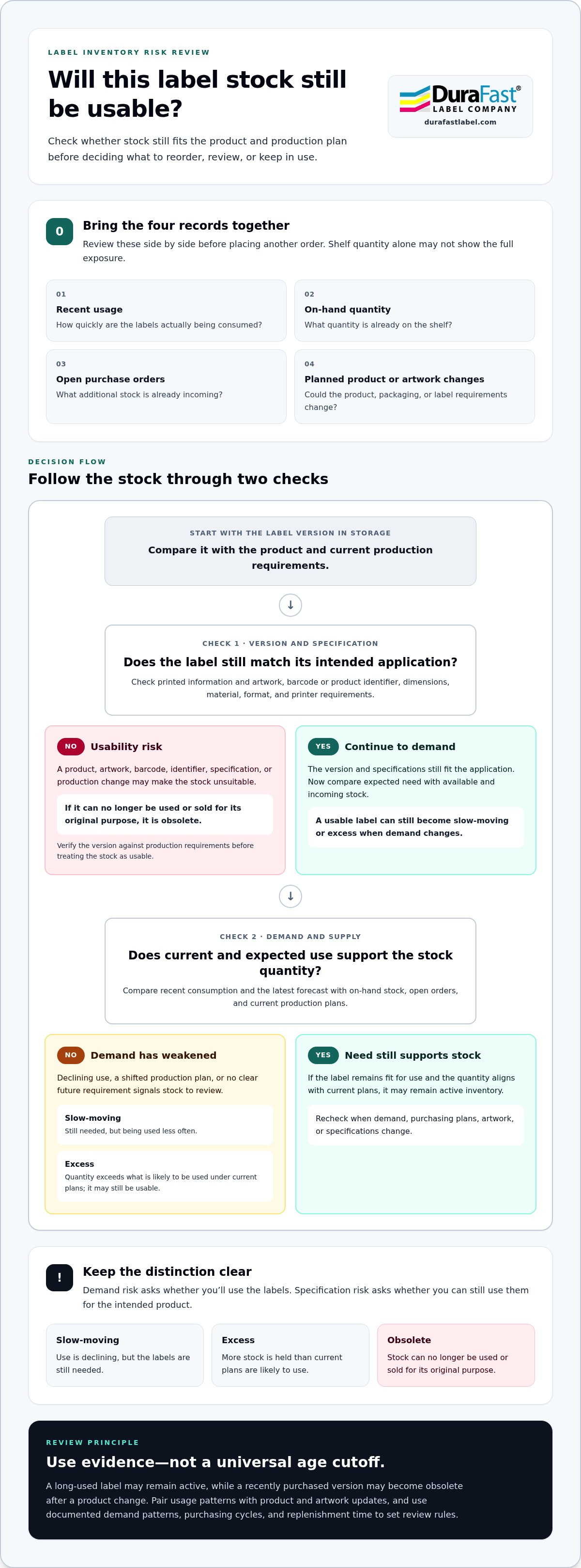
Obsolete label inventory is stock that can no longer be used or sold for its intended application. The label may be in good physical condition, but a change to the product, packaging, artwork, or required specifications can make its printed information unsuitable. For example, a label showing an old product identifier may no longer match the item it was meant to identify.
Three inventory terms help clarify the risk. Slow-moving labels are still needed but are being used less often. Excess labels exceed the quantity likely to be used under current plans. Obsolete labels can’t be used or sold for their original purpose. Slow-moving stock isn’t automatically obsolete, and excess stock may still be usable. The distinction depends on demand and whether the label still matches the product.
A label can become obsolete before it physically deteriorates if its printed information no longer matches the product it was made to identify.
How label stock moves from active to at risk
Label stock often moves through a gradual progression. A label begins as active inventory with regular use. If demand declines, perhaps because a product sells less often, it becomes slow-moving. If purchasing continues at the old rate, stock can build beyond expected use and become excess. If the product is discontinued or its packaging artwork is replaced, the remaining stock may become unusable for that application.
Track these changes rather than relying on a universal age cutoff. A label used steadily for a long time may remain active, while a recently purchased version may become obsolete after a product change. Measuring inventory turnover can help reveal stock that is moving slowly, but pair usage patterns with information about product and artwork changes.
Why labels have distinct obsolescence risks
Assess physical condition and information accuracy separately. A roll can be clean and intact yet carry outdated artwork, a replaced barcode, or an old product identifier. Version control helps teams connect each label to the correct product and approved artwork. Record the label version alongside its SKU, then confirm the stock version still matches production requirements.
Specifications matter too. A packaging change may affect label dimensions or other requirements for the intended application. For specialized uses, the label’s material and production setup also matter. For example, a pillow law label serves a different purpose from a general product label. Before treating remaining stock as usable, verify that its material, format, and printer compatibility still fit the job. This helps distinguish stock that is merely slow-moving from stock that can’t be used as intended.
Which Label Inventory Risks Should You Monitor First?
To catch at-risk stock early, look beyond the quantity on the shelf. A useful review connects four signals: changes in demand, label-version updates, specification changes, and purchasing decisions. Each can affect whether a roll will be needed and usable. Together, they show whether planned supply still matches the product and production plan.
Demand risk asks whether you’ll use the labels; specification risk asks whether you can still use them for the intended product. A label may have steady demand but become unsuitable after its barcode, material, or printed information changes. An unchanged label can become excess if demand falls.
Demand and purchasing signals that predict excess labels
Compare recent consumption with the assumptions behind the last order. If a product is selling more slowly or production plans have shifted, the original purchasing quantity may no longer fit. Review on-hand stock alongside open purchase orders and the latest forecast. An incoming order can deepen excess even when the shelf quantity alone looks reasonable.
Flag stock with declining use, no clear future requirement, or a quantity that exceeds what current plans call for. Don’t apply a universal age limit or reorder point. Set review rules using documented demand patterns, purchasing cycles, and the time your business needs to replenish stock. The aim is to identify changes early, not to treat every slow-moving roll as unusable.
Artwork and specification changes that threaten usability
Demand isn’t the only source of risk. Track pending artwork approvals and product changes against the versions already in storage. A revised barcode, product identifier, ingredient statement, or other printed text can make existing labels unsuitable, even if orders continue. For packaged food, use current FDA food labeling requirements as a reference when reviewing relevant label information.
Also check whether the label’s dimensions, material, or printer requirements still match the application. A change in the printing setup can affect which stock is suitable. For example, inkjet labels need to fit the intended inkjet production process. Treat artwork and media as linked parts of the same version record, rather than reviewing printed content in isolation.
Long purchasing horizons increase exposure because a larger quantity is committed before future demand and product changes are clear. Before placing another order, bring four records together: recent usage, on-hand quantities, open purchase orders, and planned product or artwork changes. This view shows both how much stock may be needed and whether it will remain fit for use, supporting the goal of avoiding obsolete label inventory.
If label changes are difficult to coordinate across teams, discuss your label and printing needs as part of reviewing the production setup.
How to Compare Label Stocking and Printing Approaches
The right approach depends on how predictable demand is and how often label content changes. Larger planned purchases can support steady production, but leave more finished labels exposed if artwork or product details change. Shorter replenishment cycles limit the amount committed at once, though they call for more frequent planning. In-house printing can reduce the need to hold finished labels in multiple versions, but shifts planning toward blank media, printer supplies, and production capacity.
Compare each option against four practical needs: label availability, storage, purchasing coordination, and responsiveness to change. There isn’t one best method for every label. A stable product with consistent use may suit planned buys; a product with shifting artwork may benefit from shorter commitments or printing closer to demand.
When planned label purchases make sense
Planned replenishment can work well when a product’s demand is steady and its label version is unlikely to change. A forecast gives purchasing a basis for planning, but it should account for what’s already in stock and what’s on order. Otherwise, a new purchase can overlap with existing supply and create more stock than production can use.
Base order decisions on actual consumption and your business’s replenishment needs, not a fixed quantity applied to every label. Consider how much demand may change before the next review, whether a product update is planned, and how much stock would remain if the forecast falls short. Larger buys may reduce ordering frequency, but they also increase storage needs and the amount of stock potentially affected by a change.
When flexible in-house label printing may help
Printing closer to demand can reduce the quantity of finished labels tied to one artwork version. Instead of storing large runs for several products or versions, a business can plan blank media and print labels as production needs them. This can increase flexibility, but it doesn’t eliminate inventory planning: blank stock, ink or ribbon, and printer capacity still need to match expected use.
Direct thermal and thermal transfer are distinct printing approaches, and the right choice depends on the application and required label materials. Thermal transfer printing uses a ribbon, so the label stock and ribbon need to suit the intended setup. Thermal transfer labels are one media category to consider for this workflow. Inkjet workflows likewise depend on selecting compatible inkjet labels. In either case, printing on demand can reduce finished-label exposure while leaving media selection and replenishment as ongoing decisions.
Printer technology is part of the comparison, not a separate afterthought. Reviewing a thermal label printer guide can help frame technology options alongside the label workflow. Compare the full setup, including media, ribbons where applicable, and how much label content changes. For avoiding obsolete label inventory, the practical balance is the one that keeps needed labels accessible without locking too much stock into versions that may change.
How to Build a Repeatable Label Inventory Review
A consistent review turns scattered stock information into a clear decision: keep using, hold, update, or reorder. The process doesn’t need a complex system, but it does need reliable records and clear ownership across purchasing, operations, and the people responsible for artwork or product changes. Adapt the cadence to your business, and review sooner when a meaningful change is planned.
Create a usable label inventory record
Keep one record for each label version and application. Include the SKU, description, label version, on-hand quantity, recent usage, and open orders. Add the product or application it serves and its current status, such as active, superseded, obsolete, or unverified. This gives teams a shared reference and helps prevent different versions from being treated as interchangeable.
Keep purchase and usage information together. A stock count without open orders can understate incoming supply; usage without a version identifier can hide that a particular artwork is no longer being consumed. Store current labels separately from superseded or unverified versions so outdated stock isn’t accidentally picked for production.
Turn review findings into replenishment decisions
Use a repeatable sequence to turn the record into action. Teams can adapt these steps to their inventory system and review cadence:
- Check the record. Confirm each SKU and description identifies the label’s application and version clearly.
- Reconcile supply. Compare the physical or recorded stock quantity with recent usage and open purchase orders.
- Check for changes. Review product plans, artwork approvals, and specification updates that could affect the label’s future use.
- Flag exceptions. Prioritize labels with low or changed usage, pending product updates, overlapping orders, or unclear version status.
- Choose an action. Mark each flagged item to use, pause purchasing, revise the plan, or avoid replenishing until its need is clear.
- Assign and record. Have purchasing own order decisions, operations confirm usage and stock, and the artwork or product owner confirm version changes. Record the decision and who is responsible for the next step.
Use event-based triggers as well as routine reviews. A planned product revision, artwork approval, or specification update can prompt an immediate check of related stock rather than waiting for the next scheduled review. Set triggers around your actual change process; a universal interval or aging cutoff won’t fit every label or demand pattern.
This routine supports avoiding obsolete label inventory by connecting demand, stock, and version decisions before another purchase is made. If you want to discuss how your label inventory and production needs fit together, discuss your label inventory needs.
Keep Label Inventory Flexible with the Right Production Plan
A practical production plan matches how labels are purchased or printed to how often demand and label details change. Stable, repeat-use labels may suit planned replenishment. Labels tied to frequently revised artwork may call for smaller commitments or printing closer to when they’re needed. The aim isn’t to eliminate stock. It’s to keep enough usable supply available without committing too much to a version that could change.
Match the production approach to label stability
Start by grouping labels by stability and usage. For an established product with predictable demand, planned purchases may make sense when forecasts account for stock on hand and orders in progress. For labels with changing text, graphics, or product details, consider how much finished stock to hold before the next likely revision. The right balance depends on the product’s change cycle and actual consumption.
In-house printing can offer another way to manage changing label content. It may reduce reliance on finished rolls printed with a particular artwork version, but it still requires planning for media, printer supplies, and the production setup. Inkjet labels, thermal labels, and label printers are different purchasing considerations, not interchangeable solutions. Match the media and equipment to the intended workflow and application.
For a thermal transfer workflow, treat the printer, label stock, and ribbon as one compatible setup. A purchasing review can include thermal transfer ribbons alongside the labels and printer used for production. Consider whether the supplies fit the work your team needs to do, rather than assuming a change in one component will suit the whole setup. The same principle applies to other printing approaches: evaluate the printer and media together.
Make the next inventory decision practical
Before placing the next label order, review stock that has been sitting longest or seeing the least use. Confirm its version and application, then compare the remaining quantity with current demand and open orders. Check for planned product or artwork changes that could affect whether the stock remains usable. This review may point to a better next step than automatically repeating the last purchase.
- Keep ordering when demand is clear and the label version remains current.
- Reduce or pause replenishment when existing stock or open orders may cover expected use.
- Review the production setup when label content changes often or the current media and printer arrangement limits flexibility.
For avoiding obsolete label inventory, connect each purchasing decision to both demand and exposure to change. DuraFast Label Company supplies label printing equipment and consumables, including inkjet labels, thermal labels, thermal transfer ribbons, and printers such as the Epson ColorWorks C6000A. Contact DuraFast Label Company about label printing supplies to discuss the categories that fit your label production needs.
Make Your Next Label Order More Flexible
Make your next label order a decision point, not an automatic repeat of the last one. Match stock to the current product plan and account for changes you can already anticipate. Over time, this habit can make avoiding obsolete label inventory part of routine purchasing, rather than a response to labels that no longer fit.
For your next review, choose one label family and agree on who owns its demand information, artwork updates, and replenishment decision. A clear handoff helps teams act on changes before they become mismatched orders. Build on that starting point as you refine the process across other label needs.
DuraFast Label Company offers inkjet labels, thermal labels, and thermal transfer ribbons, along with label printers from Epson and Zebra. To discuss label printing supplies for your production setup, contact DuraFast about label printing supplies. A thoughtful next order can help keep inventory useful and production ready to adapt.
Frequently Asked Questions
What is obsolete label inventory?
Obsolete label inventory is label stock that can no longer serve its intended product or application. This can include labels for a discontinued item or a version whose printed details no longer match the current product. The roll may still look clean and intact. For inventory decisions, usability matters more than appearance: if the label can’t be correctly applied to its intended product, treat it as potentially obsolete until its status is resolved.
How can I tell whether label inventory is becoming obsolete?
Look for a mismatch between the labels being consumed and what current production needs. For example, a label SKU may show little recent usage while a newer artwork version is being issued, or open orders may exceed expected use. Compare the product and version identifiers on stored rolls with current production records. These signals don’t automatically mean stock is unusable, but they can identify what to investigate before buying more.
Can changing product artwork make existing labels obsolete?
Yes. A design update can make older labels unsuitable if the revised version replaces the information, branding, or identifiers printed on them. Before reusing a prior version, compare its artwork and product details with the version approved for current production. If the team can’t establish which version is valid for the intended use, separate that stock from active supply until the responsible product or artwork owner decides what to do.
How often should a business review label inventory?
Set a review cadence that reflects how quickly demand and label versions change, then add a review when a product or artwork change is planned. A product with stable demand may need a different rhythm from one with frequent updates. Don’t rely on a generic aging rule. Use your own usage and change history to decide when a review is useful, and make sure someone owns acting on its findings.
Does printing labels in-house prevent obsolete inventory?
No. In-house printing can reduce the amount of finished stock tied to one design, but it doesn’t remove every inventory risk. Businesses still need to plan blank media and printing supplies, and printed labels can still become outdated if the wrong artwork or product data is used. A controlled process for approving print files and matching each print run to the correct product helps limit avoidable waste.
What should a label inventory spreadsheet track?
Track each label’s SKU, description, product or application, version, stock quantity, recent usage, and open purchase orders. Add a status field, such as active, superseded, or under review, and note the owner responsible for confirming artwork or product changes. If several versions share similar descriptions, make the version easy to distinguish. This record helps support avoiding obsolete label inventory by connecting stock counts to actual production needs.
What should I do with label stock that may no longer be usable?
Set the stock aside from active picking while you verify its version, intended product, and current usability. Ask the relevant product or artwork owner to compare it with the approved production information, then record the decision. If it remains suitable, update its status and use plan. If it’s superseded or cannot be verified, pause replenishment for that version and follow your organization’s process for handling unusable stock.