Color Label Printer Buying Guide: Find Your Fit
20th Oct 2026
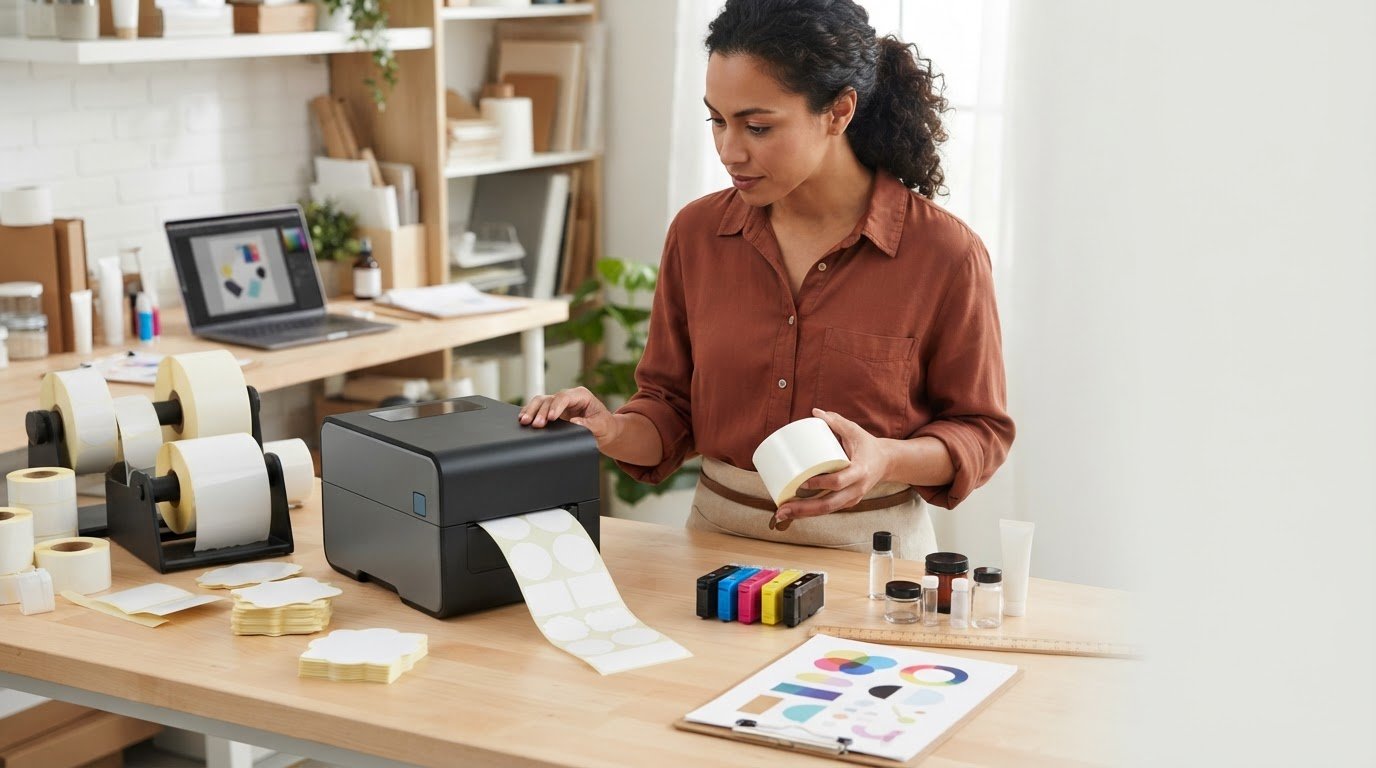
What if the colour label printer with the most impressive sample isn’t the right one for your business? Color matters, but a printer also needs to handle your label sizes and materials, fit your production pace, and work with supplies you can use consistently. Marketplace listings often mix different printer types and jobs, which can make those choices harder to compare.
It’s reasonable to start by looking for clear, attractive labels. But the better choice comes from the full workflow, not color capability alone. This guide will help you understand the main color label printer options and compare them using practical factors such as label dimensions, media, print volume, and compatible ink and supplies.
You’ll also learn how to think about the printer and its consumables as a connected system, so you can narrow your options with more confidence. DuraFast Label Company offers color label printers from top industry brands including Epson, along with related printing supplies. Use the guide to identify a sensible fit for your label jobs and next step.
Key Takeaways
- Learn what color label printers do and where they can support product identification, packaging, and short-run label production.
- See how digital artwork, printer, ink, and compatible label media work together in a color-label workflow.
- Compare a colour label printer against your label dimensions, media, print frequency, workflow, and supply needs.
- Use a practical checklist to define your label job and map how labels move from design to application.
- Explore color label printer options and related supplies from DuraFast, including Epson ColorWorks equipment.
What Is a Color Label Printer and Its Uses?
A color label printer is equipment designed to print colored graphics and text directly onto label media. It produces labels for products and packaging, including designs that combine names, descriptions, branding, and other visual information. A label printer is a broad category; a dedicated color model is intended for jobs where printed color is part of the label, rather than an incidental feature in a product listing.
Businesses use color labels to identify products, distinguish variations, and present information on packaging. They can also be useful for short-run production, where a business prints a particular design or batch as needed. In specialized workflows, the label format matters too. For example, DuraFast offers card grading labels for a distinct identification use. That does not mean every color printer works with every label type; the intended job and compatible media should guide the choice.
How does a color label printer differ from a regular label maker?
A color label printer is built for label jobs that use colored text or graphics. Many everyday label makers are primarily designed for straightforward text, often in monochrome. A photo printer may produce color images, but that alone doesn’t make it a dedicated product-label printer. Its media and workflow may be intended for photographs rather than labels.
Search results can blur these categories. Don’t choose by a “color” tag alone. Start with what you need to print, then consider the actual label format and how labels will be used. Different devices support different media and workflows, so a product’s appearance in a broad search listing isn’t proof that it fits your job.
When does in-house color label printing make sense?
Printing in-house can suit businesses whose label designs change, whose batches are smaller, or whose labels are needed at different times. A new product version, packaging update, or limited production run may call for a different design without needing the same label artwork each time. The key question is how often those changes happen and how labels move through your operation.
With an in-house setup, your team can decide when to print a batch rather than relying on a single large print run for every need. That offers direct control over print timing, but it doesn’t automatically mean lower costs or faster production. Consider the complete task: prepare the artwork, load the appropriate media, print the required labels, and apply them to products or packaging. If that process matches your needs, compare color label printer options based on the specific jobs you expect to run, not on a broad search result or color capability alone.
How Color Label Printing Connects the Printer, Ink, and Label Media
A color label starts as digital artwork, but the file alone doesn’t determine the result. The printer processes the design and applies color to label stock that suits its printing method. The printed roll or sheet then moves into the next step of your workflow, such as applying labels to products or packages.
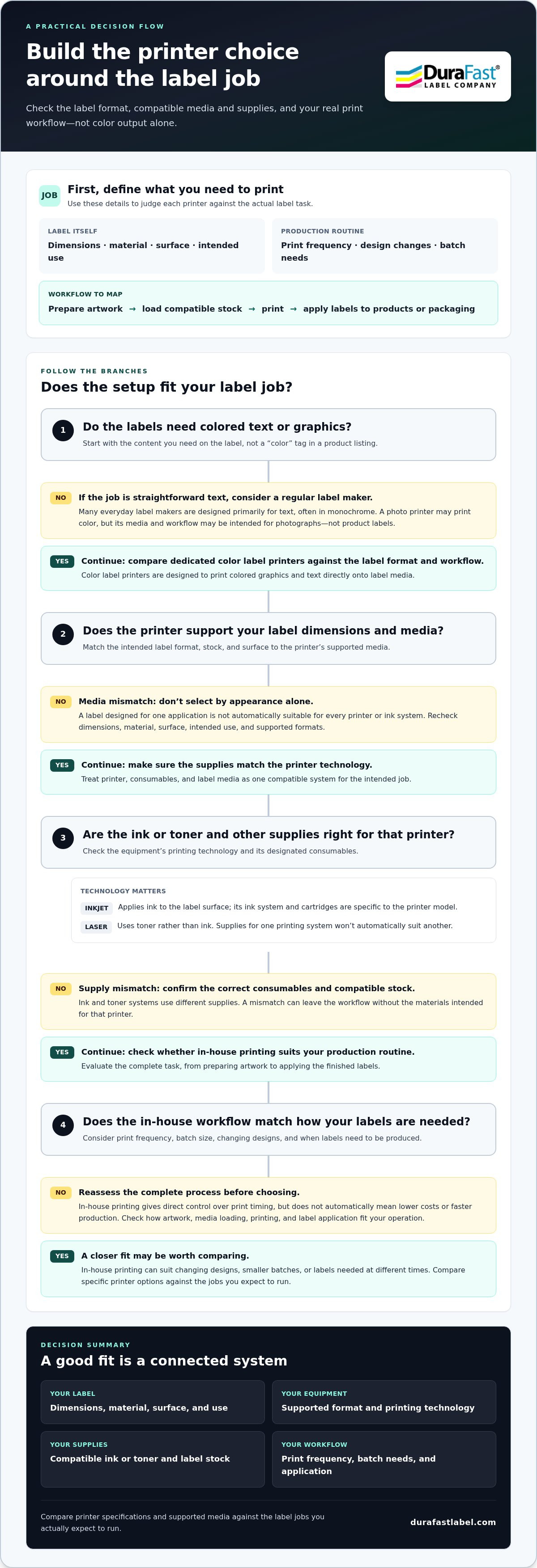
Printer, consumables, and label media must be compatible as a set for the intended job. Choosing a colour label printer without considering its ink or other supplies and the label stock can leave a mismatch in the workflow. Start with the label you need to produce, then work back through the media and printing technology to the equipment.
What role do ink and print technology play?
Inkjet is a prominent approach to color label printing. It applies ink to the label surface, and its ink system and cartridges are specific to the printer model. Color laser printing is another approach; it uses toner rather than ink. These technologies use different consumables, so supplies designed for one system won’t automatically suit another.
Neither technology alone tells you how a printer will perform for every job. Color output, media fit, and other practical factors depend on the particular printer, supplies, and label stock. For background on the role of digital systems in on-demand color label printing, see TEKLYNX’s overview. Use it as context, then assess the complete setup for your own labels.
Why does label material matter?
Label stock has a surface and intended use, and those affect what media is appropriate for a print job. A label designed for one application isn’t automatically a match for every printer or ink system. Consider the stock alongside the printer’s supported formats and the supplies it uses, rather than choosing media by appearance alone.
For example, if you’re considering inkjet equipment, compare the job’s label format with the available inkjet label options. Think through the whole path: artwork is prepared, the compatible stock is loaded, the printer uses its designated supplies, and the finished label is applied where it’s needed. This can help you identify a media mismatch before it disrupts the routine.
Before choosing, write down the label’s dimensions, material, surface, and use, then match those requirements to the printer and its supplies. Keep the pairing consistent as you plan replacements, too. DuraFast brings color label printers and related consumables together as parts of an in-house workflow. If you’re mapping out the equipment and supplies for your labeling process, get in touch with DuraFast about your requirements.
How to Compare Color Label Printers for Your Actual Label Jobs
Compare candidates against the job you need to run, not just their color output. Gather the label formats you use, how often you print, and what happens between design and application. Then compare each printer’s stated specifications and supported media with those requirements. The best-fit color label printer is the one that matches your label job and the workflow around it.
| Criterion | Occasional short runs | Recurring production |
|---|---|---|
| Label dimensions | Start with the formats needed for each limited run. | Check that the printer’s stated supported dimensions cover the formats used repeatedly. |
| Print volume | Consider how often a small batch is needed and how printing fits alongside other tasks. | Compare stated output capabilities with the production schedule and repeat demand. |
| Media | Identify the label stock required for each job, including its format and surface. | Consider how reliably your regular stock fits the printer and its specified media support. |
| Workflow | Map artwork preparation, printing, and application for each batch. | Look at how print jobs move through the team and how labels are applied. |
| Supplies | Identify the ink or other consumables required for the selected printer. | Consider the supplies needed to maintain the regular print routine. |
Which printer class matches your production workflow?
A desktop printer may suit a setup with limited workspace and labels produced as needed. A production-oriented option may be worth comparing when printing is a recurring part of the operation. Treat these as workflow prompts, not rankings: consider where the equipment will sit, how it will be used, and what label formats the work requires. Compare documented capabilities rather than assuming a class or model is automatically the better fit.
How should you assess label size, output, and supplies?
Begin with the largest label dimensions and formats your actual jobs require. Compare those needs with each candidate’s published specifications, then review the manufacturer’s documentation for supported media and stated output capabilities. Don’t assume that two printers from the same brand support the same stock or formats.
Next, connect those findings to your schedule. For occasional runs, note how often each design is printed and which supplies it uses. For recurring production, assess whether the stated capabilities and compatible consumables align with regular demand. If you’re researching Epson equipment, the Epson ColorWorks guide can add brand-specific context. Use manufacturer information to compare the candidate models, rather than treating general category advice as a product specification.
Build a short comparison sheet with one column per candidate and one row for each criterion above. Record the supporting specification or media information beside each entry. That makes mismatches easier to spot before you choose. For help connecting printer options with related supplies, contact DuraFast.
A Practical Checklist for Choosing a Color Label Printer
Before comparing models, turn your label needs into a clear brief. A little preparation helps you compare the printer, media, supplies, and workflow as one setup, rather than relying on a color label printer’s category listing or a generic ranking.
What should you prepare before comparing models?
Gather a sample of your artwork, the dimensions and material of the labels you plan to use, and a short description of where each label will go. Note how often you expect to print and how a job moves from design through printing to application. These details make it easier to compare stated capabilities with your actual work.
- Define the label job. Write down its purpose, the content it must carry, its size, and its material. Include graphics, text, barcodes, or other elements your design needs.
- Collect design examples. Use representative artwork, including versions that vary by product or packaging. Note whether designs change between batches.
- Describe print frequency. Estimate when labels are needed and whether jobs are occasional, seasonal, or part of recurring production. There’s no universal volume cutoff that suits every workflow.
- Map the production path. Record who prepares the artwork, who prints, where labels are applied, and whether printing happens in one place or across the team.
- List media and supplies. Identify the label stock and format you expect to use, along with the ink or other consumables required by each printer under consideration.
- Review software needs. Note any existing label-design, barcode, or data processes that the printer setup must accommodate. Include how designs and print jobs reach the equipment.
- Compare documented fit. Match your brief against manufacturer specifications for supported label dimensions, media, output capabilities, and required supplies. Don’t fill gaps with assumptions based on a brand or product category.
How can you assess the complete in-house setup?
Think beyond the printer itself. Your setup includes compatible label stock, the printer’s designated ink or other supplies, software, artwork preparation, and the staff steps needed to print and apply labels. A mismatch in any part can complicate the workflow, even if the printer appears suitable on paper. The overview of printing product labels in-house offers additional context for considering the production process as a whole.
Compare shortlisted options using the same brief and manufacturer documentation. If you’re weighing equipment and related supplies for your label workflow, contact DuraFast to discuss your requirements.
Explore DuraFast Color Label Printers and Related Supplies
Once you’ve mapped your label job and workflow, compare equipment and supplies as parts of the same in-house setup. DuraFast Label Company supplies color label printing equipment and related consumables, with options across the category. That gives you a practical starting point for connecting a printer shortlist with the media and supplies your labels require.
What color label printer options does DuraFast carry?
DuraFast’s listed color printer options include the Epson ColorWorks C6000A and other color label printer offerings. Use the product information for each candidate to compare its stated specifications with your label requirements. Don’t assume products in the same category share the same specifications or media support. Match the details to the label formats you intend to print.
Browse the color label printer selection with your job notes in hand. For each option, keep the key requirements together: label purpose, dimensions, material, print pattern, and how the printed labels will be applied. This keeps the search focused on practical fit rather than a brand name or broad category alone. Compare manufacturer information for the specific candidate instead of relying on general assumptions.
How do you move from shortlist to next steps?
Bring your requirements together before narrowing the shortlist. A clear summary helps you consider the complete labeling workflow and connect the equipment with supplies. Include:
- The label’s purpose, content, dimensions, and material.
- Whether printing is occasional, changes with batches, or part of recurring production.
- The artwork or barcode process, plus how labels move from printing to application.
- The media and printer supplies required for each candidate.
DuraFast’s catalog includes inkjet labels and printer inks alongside color label printing equipment. Treat these as connected parts of the decision: a promising printer is only one part of the setup, and the media and consumables need to suit the intended workflow. Keep the shortlist grounded in the candidate’s stated specifications and supplies rather than guessing from appearance or category labels.
With your label job and production pattern defined, you can have a more useful discussion about matching equipment and related supplies. Contact DuraFast about your label printing needs to discuss your colour label printer requirements and next steps.
Turn Your Shortlist into a Confident Next Step
Before choosing a colour label printer, make the decision easy to revisit. Write down why your preferred option fits your business, what trade-offs you’ve accepted, and what information would change your choice. A short decision note can help keep future equipment and supply discussions focused, especially when more than one person is involved.
It can also help to involve the team members who will prepare, print, or apply labels. Their day-to-day perspective may reveal a workflow detail that’s easy to miss during product research. Use those insights to refine your shortlist, then move forward with a clearer sense of what matters to your operation.
DuraFast Label Company supplies color label printing equipment and related consumables. Ready to discuss the requirements behind your shortlist? Contact DuraFast to discuss your color label printer needs. You’re well placed to take the next step with a choice grounded in your business’s real work.
Frequently Asked Questions
What is a color label printer used for?
A color label printer is used to produce labels with colored text, graphics, or both for products and packaging. For example, a food producer might print different package designs for several product varieties, while a small business could produce a limited batch for a new item. The right use depends on the label job, including its format and content, and on whether the printer supports the media needed.
Can a color label printer print barcodes?
Yes, a color label printer can print barcodes if the printer and label-design workflow support the barcode format and layout you need. For example, artwork might combine a colored product design with a black barcode. Make sure the barcode is generated correctly in your design software and that the printed result can be scanned as intended. Don’t assume every printer or design workflow handles barcodes in the same way.
Is a color label printer the same as a photo printer?
No. Both can print color, but a photo printer is designed around photo output, while a color label printer is intended for producing labels. Their media handling and supported formats may differ. A photograph printed on suitable paper isn’t automatically a usable product label. If you need labels that feed into a packaging workflow, compare equipment based on label support and the finished format, not color output alone.
How do I know whether a label will work with my printer?
Compare the label’s format and material with the printer manufacturer’s supported media information. Check the dimensions, stock type, and any format requirements stated for the specific printer model. If you already have a label sample, use its details to narrow the match instead of relying on a broad product description. Compatibility is model-specific, so don’t assume a label that works in one printer will work in another.
Can I use any inkjet label in a color label printer?
No. An inkjet label needs to be suitable for the particular printer and its supported media, so “inkjet” alone isn’t enough to establish compatibility. Compare the label format and material with the printer’s documentation, and match supplies to the model’s ink system. For example, a label roll and a sheet label may require different media handling. Check the specific printer and label information before selecting stock.
Do color label printers print in black and white?
Many color label printers can produce designs that use black, white, or grayscale elements, but the exact printing options depend on the model and its supplies. A label design might use black text on a colored graphic, or a simple monochrome layout. Review the printer’s documentation for supported color settings and consumables, especially if most of your labels use black text and only occasional jobs need color.