Durable Mobile Thermal Labels for Outdoor & Chemical Use
20th Oct 2026
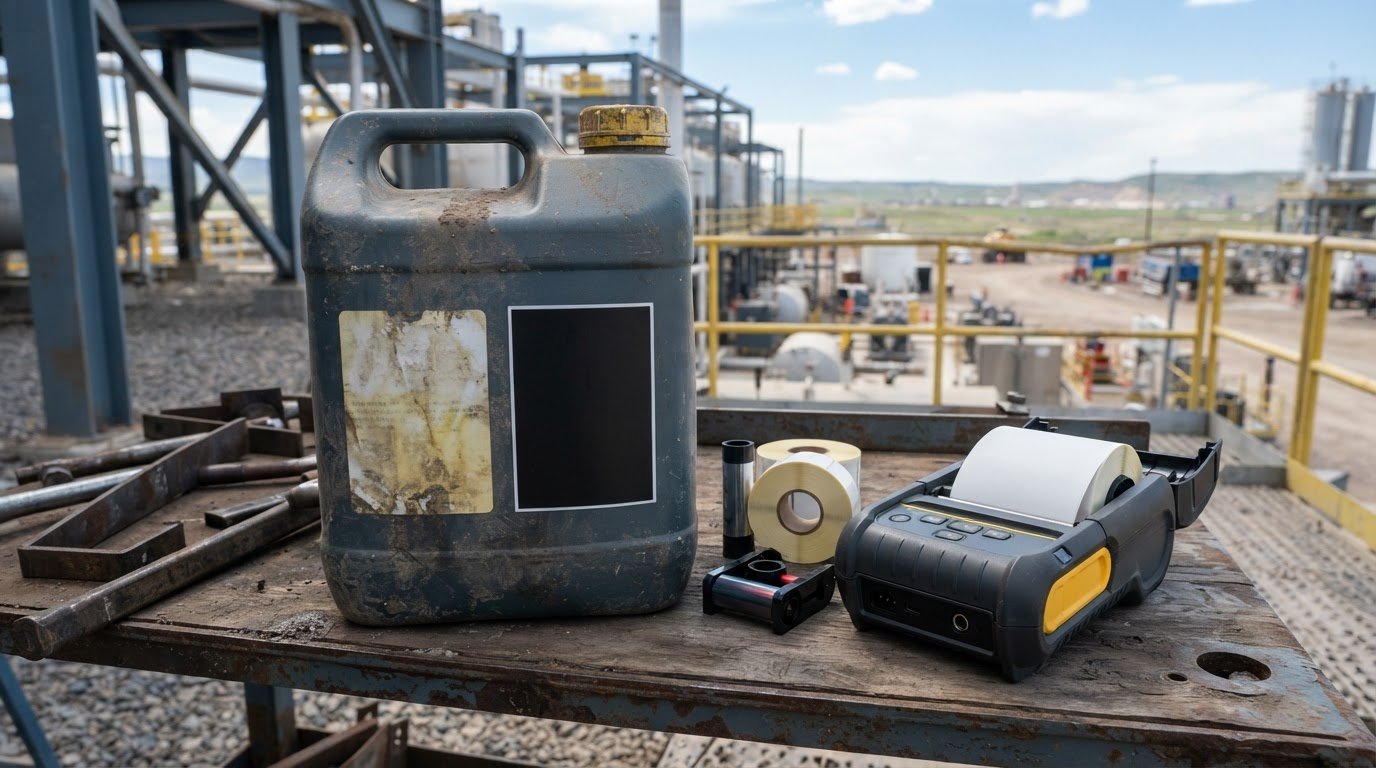
Ribbon-free printing isn’t always the better fit. For outdoor labels and chemical containers, thermal transfer is generally the stronger choice: it uses a ribbon to create a longer-lasting image, while direct thermal labels can fade with exposure to water, chemicals, or strong sunlight. Mobile direct thermal labels for outdoor and chemical containers are best treated as a short-term option, not the default for lasting identification.
Direct thermal printing is straightforward because it uses no ribbon. Whether it suits mobile direct thermal labels for outdoor and chemical containers depends on how long the label must stay readable and what it will face. A short-term task has different demands from a label exposed to weather, handling, or chemicals.
This comparison explains how direct thermal and thermal transfer differ in scan reliability, ribbon use, exposure resistance, label materials, formats, and container applications. Learn when a mobile printer’s direct thermal capability is practical, when thermal transfer is better suited to demanding conditions, and what to consider when choosing labels for outdoor or chemical use.
Key Takeaways
- Choose the print method around how long a label must remain readable and the conditions it will face.
- For dependable barcode scanning, account for how exposure and fading can affect the printed image over time.
- Mobile printers commonly use direct thermal printing, while thermal transfer requires a ribbon for a more durable image.
- Match label material and adhesive to the container surface and its exposure to chemicals, water, sunlight, and abrasion.
- Explore options such as DuraFast Matte Chemical Labels and the Epson ColorWorks C6000A when planning a chemical-label setup.
Barcode readability and scanning
A barcode works only while its bars and spaces remain clear enough to scan. For outdoor and chemical containers, compare the print method, required label life, and expected exposure before choosing.
In U.S. workplaces, OSHA and GHS labeling address communication of chemical hazards; a barcode does not replace that information. Applicable label content depends on the chemical classification and container context.
Barcode Readability
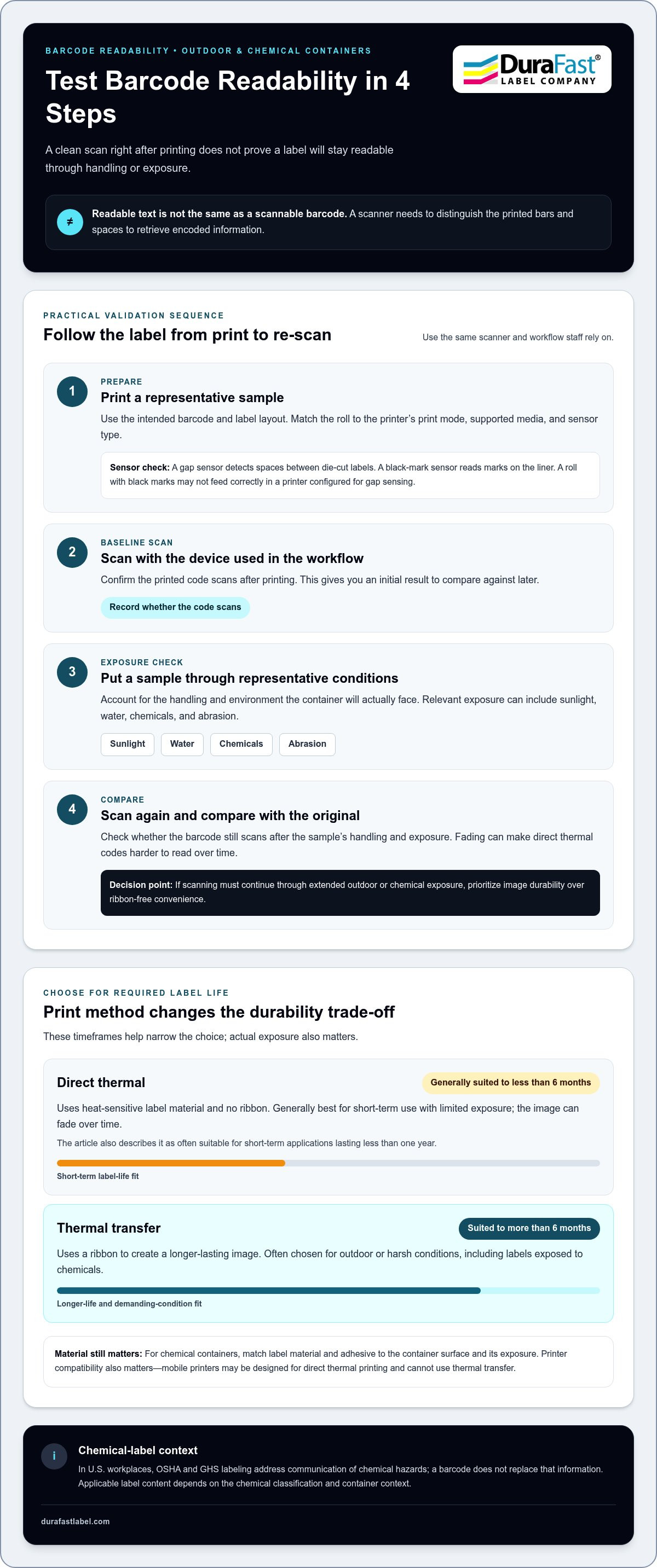
Barcode readability means a scanner can distinguish the printed pattern and retrieve its encoded information. Direct thermal labels can fade over time, making codes harder to read and scan. Thermal transfer uses a ribbon to create the image and generally offers a longer-lasting option for demanding applications. This difference matters when a container’s barcode must remain usable beyond brief handling or transit.
Test the printed code with the scanner used in your workflow. Scan the label after printing, then repeat after representative handling and exposure. A clean scan at application time does not show that the code will remain readable outdoors or around chemicals. For example, a faded barcode on a storage container can slow identification even when its text still looks legible.
Label Readability and Lifespan
Label lifespan affects both the printed text and barcode. Direct thermal printing is generally best for labels expected to last less than six months, and often for short-term applications lasting less than one year. Thermal transfer suits labels used for more than six months or exposed to harsh conditions. These ranges help narrow the choice, but actual exposure also matters.
Look beyond the first scan. Sunlight, water, chemicals, and abrasion can affect direct thermal labels and reduce legibility over time. A label used for repeated inventory checks needs a readable image throughout its working life. Match the print method to the required duration, then consider whether the container’s environment could shorten that lifespan.
| Print option | Barcode scanning | Label life | Exposure fit |
|---|---|---|---|
| Direct thermal | Can become harder to scan as the image fades | Generally suited to less than six months | Better for short-term use with limited exposure |
| Thermal transfer | Longer-lasting image supports continued readability | Suited to more than six months | Often chosen for outdoor or harsh conditions |
Choose based first on how long the label must remain readable, then account for exposure and scanning frequency.
Use these practical steps to assess a barcode label:
- Print a sample with the intended barcode and label layout.
- Scan it using the device and workflow used by staff.
- Expose a sample to representative handling and conditions.
- Scan again and compare the result with the original.
For mobile workflows, compare mobile direct thermal labels for outdoor use against the container’s expected environment. If scanning must continue through extended outdoor or chemical exposure, prioritize image durability over ribbon-free convenience.
What is the difference between direct thermal and thermal transfer printing?
Direct thermal uses heat-sensitive label material; thermal transfer uses a ribbon. In the United States, printer and roll prices vary with printer features, label material, roll format, and purchase quantity.
Direct Thermal Printing
A direct thermal printhead heats coated label material to create an image without a ribbon. This ribbon-free setup simplifies printing, but the label itself must respond to heat. The image can fade over time, especially when exposed to sunlight, water, or chemicals.
Mobile printers may be designed for direct thermal printing, so label compatibility is important. That makes them useful for portable workflows, but rules out thermal transfer printing on those devices. Some thermal transfer printers also support direct thermal mode, allowing ribbon-free printing when compatible labels are loaded.
Match the roll to the printer’s sensing method. A gap sensor detects spaces between die-cut labels; a black-mark sensor reads marks on the liner. For example, a roll with black marks may not feed correctly in a printer configured for gap sensing.
Print Method by Label Life and Environment
Choose thermal transfer for labels expected to last more than six months or face harsh conditions. Heat transfers wax- or resin-based ribbon ink onto the label, creating a more durable image. Wax ribbons suit many general-purpose uses; resin ribbons are selected when greater print resistance is needed.
Direct thermal generally suits labels expected to last less than six months. Parcel labels often need to last only a few days in transit, while an outdoor container may need readable identification much longer. For chemical containers, the label material and adhesive also matter. Thermal transfer is suitable for outdoor applications and labels exposed to chemicals.
Printer compatibility narrows the options. Check the printer’s print mode, supported media, and sensor type against the roll. Chemical-resistant bottle label listings may identify thermal transfer as the supported print type. Don’t assume a mobile direct thermal printer can use those labels just because their size appears compatible.
- Short-term use: Choose direct thermal when the label has a brief job and limited exposure.
- Longer life or harsh exposure: Consider thermal transfer with a compatible ribbon and label material.
- Portable printing: Select direct thermal rolls designed for the mobile printer and its sensor.
Compare thermal transfer labels with the expected label life and container conditions. For help narrowing the print method and media combination, share your label requirements.
Direct thermal printing and ribbon-free operation
A mobile direct thermal printer creates an image by heating coated label material. It needs no ribbon, simplifying loading during mobile work. That convenience has a clear limit: mobile printers can print only direct thermal labels.
For a warehouse worker labeling items along a picking route, fewer consumables can make the setup easier to carry and reload. There’s no ribbon roll to install, match, or replace. The printer still needs compatible labels, whose coating darkens under the printhead’s heat to form text and barcodes.
Ribbon-free operation doesn’t make every label suitable for every task. Direct thermal images can fade over time and with exposure to water, chemicals, or strong sunlight. This makes the method practical for short-term identification, but less suitable for containers expected to remain outdoors or around chemicals for extended periods. The label’s environment matters as much as the printer’s portability.
- Choose direct thermal for mobile printing where ribbon-free operation and short-term use fit the job.
- Choose thermal transfer when the label needs a longer-lasting image or faces harsh conditions.
- Match the roll to the printer’s supported label width, core, and sensing method.
Printer size also shapes a mobile setup. A compact unit is easier to carry through aisles or between work areas, while label width determines what information fits on each print. For example, a narrow identification label may suit a small mobile printer, while a larger container label may require a wider format. Check both the printer’s media path and the label layout before choosing rolls.
Roll handling matters on the move. A correctly sized roll feeds through the printer without forcing the media path, and its sensing marks or label gaps must match the printer’s sensor. A mismatch can cause skipped labels or incorrect positioning. Test a sample roll in the mobile printer before assigning it to a route.
Some thermal transfer printers also support direct thermal mode. This gives one printer two print methods, provided the selected labels match the chosen mode. A mobile printer, by contrast, remains direct thermal only. For a mobile label workflow, confirm the printer’s method first, then choose media designed for it.
Use mobile direct thermal labels for outdoor and chemical containers only when the expected exposure and label life suit direct thermal printing. In tougher conditions, a ribbon-free workflow may not be worth sacrificing image durability. Base the decision on where the container travels, how long its barcode must stay readable, and whether staff can replace labels during normal handling.
Exposure to chemicals, water, sunlight, and abrasion
Label performance depends on both the printed image and the material carrying it. Compare exposure conditions before choosing a label for an outdoor or chemical container.
Outdoor Exposure
Outdoor exposure combines sunlight, water, and surface wear. Direct thermal labels are sensitive to strong sunlight and water, which can fade the printed image. Repeated handling can also wear away printed details. Thermal transfer is suitable for outdoor applications, while the label material determines how well the label itself holds up.
For a container stored outdoors, consider whether staff must scan its barcode after prolonged exposure. Polyester is described as the most durable and longest-lasting thermal transfer material. Material selection matters alongside print method, especially when a label must remain readable through weather and handling.
Chemical Resistance
Chemical resistance means the label and printed information can withstand contact with substances present in the work area. Direct thermal labels are sensitive to chemicals, so they can be a poor match for long-term container identification around chemical exposure. Thermal transfer printing can be used for labels exposed to chemicals.
Choose media based on the actual container and its exposure. A chemical-resistant bottle label listing may identify thermal transfer as its supported printer type. That detail matters: both printer compatibility and resistance count. A label that fits the container but cannot tolerate its chemical environment may lose readable text or barcode information.
Evaluate the label as a complete system, not just the printed image. The face material carries the image, while the adhesive keeps the label attached to the container. A chemical or wash-down process may affect either part. For example, readable print is of little use if a label lifts from a curved bottle during routine handling.
Use a practical evaluation process before choosing a production label:
- Identify the container surface, including whether it is smooth, curved, or textured.
- List the exposures the label will face, such as sunlight, water, chemicals, and abrasion.
- Choose compatible label material and print technology for those conditions.
- Print a sample and apply it to the intended container.
- Assess adhesion, text legibility, and barcode scanning after representative exposure.
Keep exposure tests relevant to real use. A bottle kept indoors has different demands from one handled outside, wiped down, or exposed to chemicals. Test the printed label on the actual container rather than relying on the appearance of an unused roll. Check both adhesion and scan performance after exposure.
For longer outdoor use or chemical contact, thermal transfer with a suitable plastic or polyester label is generally a stronger option than direct thermal. Direct thermal can still suit short-term tasks with limited exposure. The deciding factors are chemical contact, sunlight, moisture, abrasion, container surface, and required readable life.
Label sizes, adhesives, and roll formats
Label fit depends on the container, printer, and information printed. Chemical-resistant bottle labels are listed in 17 products, in roll format and rectangular shape. Use those details as a starting point, then match the label dimensions and adhesive to the application.
Start with the container surface. A flat bottle offers different label placement options from a narrow, curved container. Measure the available panel and consider how much space the product name, hazard information, and barcode need. For example, a label that wraps too far around a small bottle can wrinkle or obscure printed details.
Adhesive choice affects whether a label stays attached during handling. A container may be smooth, textured, or curved, and each surface creates different application conditions. Consider whether staff apply labels to clean, dry containers or handle them soon after application. Test a sample on the actual container, then check its edges after normal handling.
Roll format must also suit the printer. Confirm the roll width, core, and outside diameter against the printer’s media path. Check whether the printer senses gaps between labels or uses black marks on the backing. A mismatch can cause feeding or positioning problems, even when the label fits the container.
- Measure the label area: Record the usable panel on the container before choosing dimensions.
- Plan the layout: Leave room for readable text and barcode scanning.
- Match the roll: Compare roll width, core, and diameter with printer requirements.
- Test the adhesive: Apply a sample to the intended surface and inspect it during handling.
Shape matters, too. Rectangular labels suit many bottle panels, but a narrow container may need a smaller footprint. Avoid placing essential text across a curve or near an edge staff regularly touch. A clear layout gives operators room to read the information and position a scanner over the barcode.
For mobile direct thermal labels for outdoor and chemical containers, check media compatibility and expected exposure. A mobile printer requires direct thermal labels, while chemical-resistant bottle label listings may identify thermal transfer as the supported printer type. These are different print workflows, so match the printer and label technology before ordering rolls.
Before moving to a full run, print and apply a sample. Check that the printer feeds the roll correctly, the label sits flat, and the barcode scans in its intended position. Then review adhesion after representative handling. To discuss label dimensions, roll format, and container fit, share your label and printer requirements.
DuraFast Label Company: Epson ColorWorks C6000A
DuraFast Label Company helps match label printing equipment, media, and software to container-label workflows. For color label production, the Epson ColorWorks C6000A is a reliable option. DuraFast Matte Chemical Labels provide a label choice for chemical-container applications, while BarTender Professional Software supports label design and barcoding.
Choose based on print method, label material, container surface, and expected exposure. A mobile direct thermal setup serves a different purpose from a color label printer, so align equipment and labels with where printing happens and how long the information must remain readable. For chemical containers, consider the label and printing system together, not just the printer.
Contact DuraFast Label Company to discuss your printer, label, and software requirements.
Plan your next label run with confidence
Before choosing a setup, map the label’s full journey: where it will be printed, which container it will identify, and what conditions it will face. This helps distinguish a portable, ribbon-free task from the need for a more durable container-label system. For mobile direct thermal labels for outdoor and chemical containers, match the print method and media to the job rather than choosing for convenience alone.
DuraFast Label Company offers the Epson ColorWorks C6000A and Afinia L801 Color Label Printer for color label workflows, along with DuraFast Matte Chemical Labels. These options can help you build a setup around your container and labeling requirements. Share the intended use, printer workflow, and label needs to discuss suitable options.
Contact DuraFast Label Company to take the next step toward a practical labeling workflow. A well-matched setup can make everyday identification clearer and easier to manage.
Frequently Asked Questions
Are direct thermal labels suitable for outdoor use and how long do they last?
Direct thermal labels can suit short-term outdoor use, but exposure may shorten their readable life. They’re generally best for applications lasting less than six months, and often for short-term uses under one year. A parcel label in transit briefly has different demands from a container left outside. Decide based on the required readable period and expected sunlight, moisture, and handling.
How do sunlight, heat, moisture, and abrasion affect direct thermal label durability?
Strong sunlight, water, and chemical exposure can fade direct thermal images; abrasion can wear printed details during handling. Heat also matters because direct thermal labels darken when heated. For example, a container stored near a warm process area may face both environmental exposure and heat. Assess whether text and barcodes remain legible after the label experiences conditions expected in its actual workflow.
Are direct thermal labels resistant to common chemicals and solvents?
Direct thermal labels are sensitive to chemicals, so don’t assume they’ll resist a particular solvent or chemical mixture. Resistance depends on the label construction and the substance it contacts. A brief splash and repeated contact create different demands. For a container that may be wiped down or exposed during handling, evaluate the specific label against the actual chemical and inspect both printed information and adhesion.
What label materials and topcoats work best for outdoor chemical containers?
For longer-lasting thermal transfer applications, polyester is identified as the most durable and longest-lasting material; thermal transfer can also use paper and plastic labels. The right face material and topcoat depend on the chemical, exposure, and container. Don’t select a topcoat by name alone. Test the complete printed label, including its adhesive, because both the image and label attachment need to hold up.
How do direct thermal labels compare with thermal transfer labels for outdoor and chemical applications?
Direct thermal avoids ribbon use, while thermal transfer uses ribbon to create a longer-lasting image. Thermal transfer is suitable for outdoor applications and labels exposed to chemicals; direct thermal is more appropriate for short-term work with limited exposure. For example, choose based on whether the label supports a brief handoff or ongoing identification. Material, adhesive, and printer compatibility also shape the final choice.
Which mobile printers support direct thermal labels for chemical containers?
Mobile printers print direct thermal labels, not thermal transfer labels. They are suitable only when direct thermal media fits the container’s expected conditions and label life. A chemical-resistant bottle label listing may specify thermal transfer as its supported printer type, indicating a different workflow. Match printer technology to the required media before choosing a mobile setup for container labeling.
What label sizes, adhesives, and core specifications are compatible with mobile thermal printers?
Compatibility depends on the printer’s supported label width, roll dimensions, core, and sensing method. There’s no universal roll specification for every mobile printer. For example, the same label width may still feed incorrectly if its core or outside diameter doesn’t suit the printer. Match the adhesive to the container surface, then verify that the chosen roll feeds and positions properly in the intended device.
How should chemical-container labels be tested for chemical resistance and outdoor durability?
Test a printed sample on the actual container under conditions expected in service. Apply the label, expose it to representative chemical contact, sunlight, moisture, and handling, then inspect adhesion and legibility. Scan the barcode again after exposure. Record the label material, adhesive, and print method so the result applies to the exact setup, not just a similar-looking label.