How to Print Your Own Product Labels: A 2026 Guide to In-House Success
26th Jun 2026
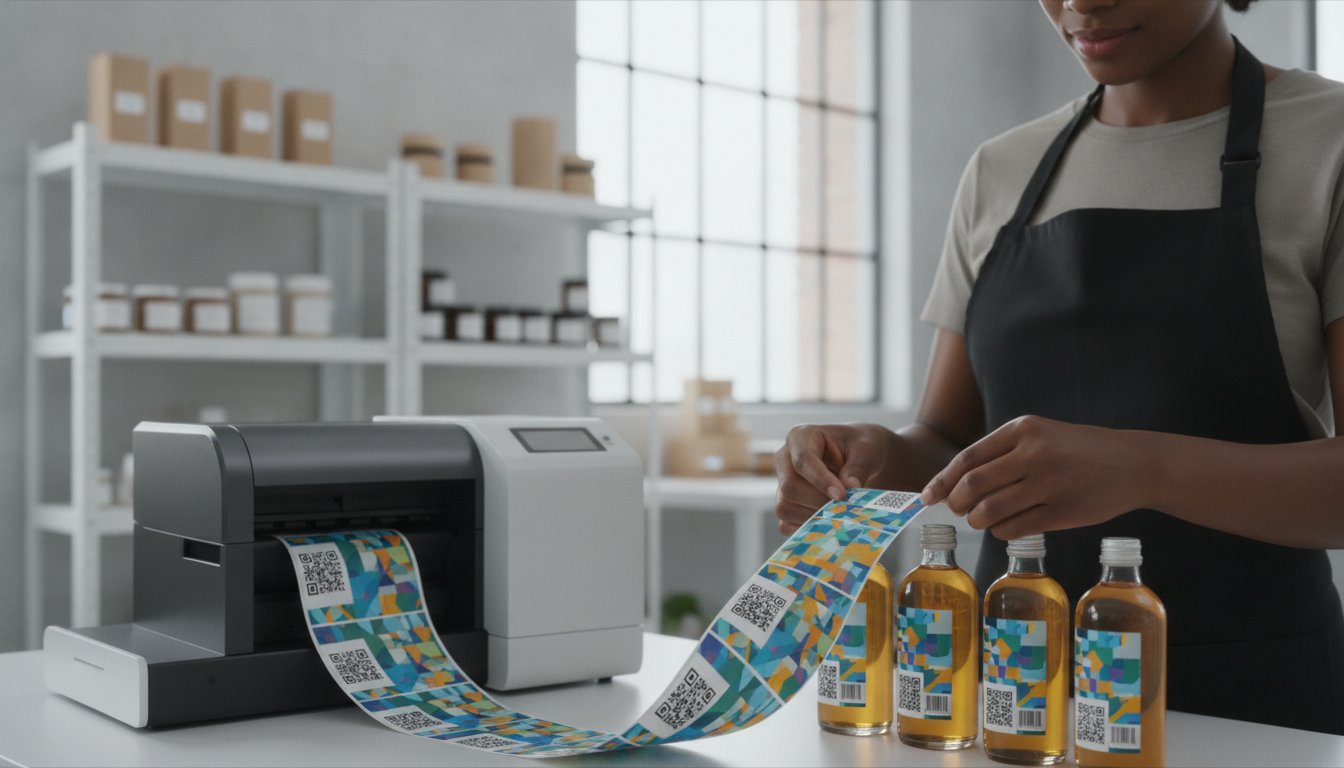
What if the most expensive part of your product isn't the ingredients, but the pile of outdated labels sitting in your warehouse? It’s a common frustration for growing brands. You’re likely tired of high minimum order quantities and the waste that happens when regulations change or designs evolve. Between the June 2026 Food Labeling Modernization Act and stricter "Product of USA" rules, keeping your packaging compliant requires more agility than a traditional print shop can offer.
We agree that waiting weeks for a shipment that might be obsolete by the time it arrives is no way to run a business. Learning how to print your own product labels is the fastest way to regain control over your production timeline and your budget. This guide will show you how to transition to a professional in-house setup that reduces your cost per label while improving flexibility for seasonal or small-batch runs. We will walk through the essential hardware, software, and 2026 standards you need to achieve durable, retail-ready results directly from your own facility.
Key Takeaways
- Stop wasting capital on high minimum order quantities and outdated inventory by transitioning to a flexible, print-on-demand model.
- Discover whether high-resolution inkjet or durable thermal transfer technology best matches your specific brand aesthetic and product environment.
- Learn how to select professional media and adhesives to ensure your labels remain legible and secure in freezer, chemical, or retail settings.
- Master the step-by-step process of how to print your own product labels using professional software like BarTender for seamless data integration.
- Optimize your long-term workflow by calculating the total cost of ownership and leveraging bulk supply savings to lower your cost-per-label.
Why Businesses Are Switching to In-House Label Printing in 2026
For years, small and mid-sized brands were forced to play a waiting game with commercial print shops. That dynamic is shifting rapidly. Businesses are realizing that learning how to print your own product labels isn't just about convenience; it's a vital strategic move to protect profit margins. By bringing production in-house, you eliminate the restrictive Minimum Order Quantities (MOQs) that often force you to buy 5,000 labels when you only need 500. This shift frees up capital that would otherwise be sitting in a warehouse as dead inventory.
The ability to print on demand gives you a level of control that outsourcing can't match. You can update designs instantly, tweak ingredient lists, or add seasonal branding without worrying about wasting old stock. It transforms your supply chain from a rigid, external dependency into a resilient, internal asset. Instead of waiting weeks for a delivery, you can go from a design concept to a finished roll in minutes. This agility is especially important as global logistics remain unpredictable, making self-reliance a major business advantage.
The Hidden Costs of Outsourcing Your Labels
The financial drain of outsourcing goes beyond the per-label price. Shipping costs and rush fees for last-minute orders can quickly erode your margins. Perhaps the most significant hidden cost is obsolescence. Industry data suggests that roughly 20% of outsourced labels end up in the trash because of design changes or regulatory updates. In 2026, this risk is higher than ever. With the June 2026 Food Labeling Modernization Act requiring new front-of-package warnings and the USDA's stricter "Product of USA" rules effective January 1, 2026, a bulk order placed today could be illegal to use by next month. Using your own color label printers ensures you only produce what you need right now.
Speed to Market: The Competitive Edge of In-House Production
Agility is the new competitive standard. In-house production allows you to respond to market shifts in real-time. If a retailer in a specific region needs a unique QR code or a different language, you can adjust the file and start printing immediately. This speed is essential for seasonal products or testing small batches of new flavors. You don't have to wait three weeks for a proof; you can have a finished, professional product on the shelf in under an hour. Understanding various label printer technologies helps you choose the right speed and quality for your specific workflow. Whether you're responding to the FTC's increased enforcement of "Made in USA" claims or launching a limited-time promotion, in-house printing keeps you ahead of the curve.
Choosing the Best Label Printer for Your Product Needs
Selecting the right hardware is the most critical step in learning how to print your own product labels. While some hobbyist forums suggest using a standard office inkjet, these machines aren't designed for the specific needs of commercial packaging. Professional hardware provides a significantly better ROI through lower ink costs and superior label durability. You'll need to choose between desktop models for limited runs and rugged industrial printers for high-volume environments. The decision usually comes down to your brand aesthetic and the environment where your product will be sold.
Inkjet Color Label Printers for High-Impact Branding
High-impact visuals matter for retail success. The Epson ColorWorks C6000A is a favorite for mid-volume production because it produces sharp, photo-quality results that make products pop on the shelf. If you need extreme speed, the Afinia L801 uses Memjet technology to print at incredible rates without sacrificing detail. When designing your layout, ensure you meet FDA food labeling requirements for font size and placement. Explore our color label printers to find a match for your specific brand aesthetic.
You also need to choose the right ink type. Pigment-based inks offer superior water and UV resistance, which is essential for chilled beverages or outdoor products. Dye-based inks provide the most vibrant colors and are perfect for luxury dry goods. Matching the ink to your product environment prevents fading and bleeding over time.
Thermal Transfer Printers for Industrial Durability
For warehouses and shipping centers, durability is king. The Zebra ZT411 is built for high-volume barcodes and shipping labels. Unlike inkjet printers, these use thermal transfer ribbons to create text that won't smudge or fade under harsh conditions. This technology is ideal for tracking assets or creating chemical-resistant labels that must survive heavy handling. Learn more about industrial barcode printers for heavy-duty applications.
Learning how to print your own product labels requires a clear understanding of two technical pillars:
- Resolution (DPI): Measured in Dots Per Inch. A 300 DPI setting is the standard for crisp text, but 1200 DPI is better for intricate logos or very small ingredient lists.
- Speed (IPS): Measured in Inches Per Second. While a high IPS saves time during large runs, you must ensure your label material and adhesive can handle the rapid movement without jamming.
Balancing these factors ensures your labels look professional every time they leave the printer. If you're unsure which model fits your specific workflow, contact our experts for a personalized recommendation.
Selecting Professional Media and Ink for Durability
Your choice of label material is just as important as the printer itself. While hobbyist tutorials often suggest using basic sticker paper from a craft store, these materials fail quickly when exposed to moisture, oils, or sunlight. If you want to know how to print your own product labels that actually last, you must match the substrate to the product's environment. For example, Biaxially Oriented Polypropylene (BOPP) is the industry standard for bath and body products because it resists water and oils. For industrial applications, polyester offers extreme heat and tear resistance that paper simply cannot provide.
Adhesive selection is another functional detail that many businesses overlook. A standard permanent adhesive works for most retail shelves, but specialized environments require more. If your products are stored in industrial chillers, you need freezer-grade adhesives that won't lose their grip in sub-zero temperatures. Conversely, if your packaging is meant to be reused, a high-quality removable adhesive ensures the label peels off cleanly without leaving a sticky residue. You can browse our specialized inkjet labels to find the exact material and adhesive combination for your specific surface.
Professionals in the In-Plant Printing and Mailing Association emphasize that durability is a pillar of in-house success. Using "matte chemical labels" is often essential for businesses dealing with GHS (Globally Harmonized System) requirements. These labels are designed to withstand harsh solvents and environmental stress, ensuring that critical safety information remains legible throughout the product's lifecycle. Investing in the right media from the start prevents the cost and embarrassment of labels that peel or fade before they reach the customer.
Matte vs. Glossy: Choosing the Right Finish
The finish you choose dictates the perceived value of your brand. Glossy labels are a popular choice for premium food and beverage packaging because they make colors appear more saturated and vibrant. Matte finishes are gaining traction in 2026 for their modern, high-end feel and superior readability under bright retail lights. Before committing to a large volume, always request a sample roll. Testing how the ink sits on the finish and how the label looks under your specific lighting is a crucial part of learning how to print your own product labels with professional results.
Understanding Chemical Resistance and BS5609 Compliance
For businesses in the marine or chemical sectors, BS5609 compliance is a non-negotiable standard. This certification ensures that a label can remain submerged in salt water for 90 days and still be legible. Achieving this level of durability requires a specific synergy between pigment-based inks and specialized synthetic media. Pigment inks bond deeply with the topcoat of the label material, creating a result that resists fading from UV exposure and smudging from chemical contact. This ensures your products remain compliant and professional even in the roughest handling conditions.
The Step-by-Step Process to Print Your Own Product Labels
Transitioning from outsourcing to an in-house setup requires a methodical approach. It isn't just about hitting a button; it's about creating a repeatable system that ensures every label meets retail standards. If you want to know how to print your own product labels with professional results, you need to treat the process like a production line. Following a structured workflow prevents expensive media waste and ensures your barcodes scan correctly every time.
- Step 1: Design with High-Resolution Assets. Always use files with a minimum of 300 DPI. Lower resolutions result in pixelated text and blurry logos that signal poor quality to consumers.
- Step 2: Integrate Your Data. Use professional software like BarTender Professional to link your designs to your product databases. This allows for automated updates to batch numbers and expiration dates.
- Step 3: Calibrate the Hardware. Set your printer to recognize the specific label size and gap sensor type. This prevents the "drifting" effect where the design slowly shifts off-center.
- Step 4: Perform a Test Print. Run a single label to verify color accuracy and alignment before committing to a full roll.
- Step 5: Execute and Monitor. Start your print run but stay nearby. Periodic checks ensure that ink levels remain consistent and the media stays aligned.
Designing for Success with Professional Software
Standard graphic design tools often fall short when it comes to technical accuracy. BarTender Professional is specifically engineered to handle the complexities of barcode generation and data integration. It ensures that your GS1 barcodes are perfectly sized and high-contrast, which is vital for retail scanning. You can also set up dynamic fields to automatically pull information for the June 2026 nutrition labeling updates. Managing your color profiles within this software ensures your brand colors remain identical across different media types, from glossy paper to matte synthetics.
Setting Up Your Printer for Consistent Quality
Mechanical precision is the backbone of a successful run. Load your media carefully, ensuring the guides are snug but not tight enough to warp the backing. This prevents jams and skewing that can ruin an entire roll of expensive labels. Regular maintenance is equally important. Clean your printhead with approved wipes every time you change a roll to remove dust and adhesive buildup. Using the correct Epson inks helps maintain peak performance and prevents clogs that can lead to streaking. If you need help choosing the right software or hardware for your specific workflow, talk to our technical support team today to find the perfect fit for your production needs.
Optimizing Your Workflow for Long-Term Cost Savings
Success in label production isn't just about the first print; it's about the thousandth. When you master how to print your own product labels, your focus should shift toward Total Cost of Ownership (TCO). This metric includes the initial hardware investment plus the recurring costs of ink, media, and maintenance. Many businesses make the mistake of only looking at the printer's price tag. However, the real savings come from optimizing your daily operations and reducing waste over time.
One of the most effective ways to lower your cost-per-label is through bulk purchasing. Buying your inkjet labels or thermal ribbons in larger quantities significantly reduces the unit price. High-speed printing and automated labeling systems can also drastically cut labor costs. By spending less time loading media and more time on high-value business tasks, you improve your overall operational efficiency. For a deeper look into the financial impact of different models, check out The Ultimate Buying Guide to Label Printers for a full ROI analysis.
Calculating Your Real Cost Per Label
Understanding your margins requires a close look at the data. When you print in-house, your cost per label typically ranges from $0.03 to $0.15 depending on the design and material. Compare this to outsourced small batches, which can easily exceed $0.50 per label. This price gap adds up quickly over a year of production. You also need to factor in the value of your time. Eliminating the three-week wait for a shipping carrier to deliver outsourced stock means you can turn inventory faster and respond to sales spikes without delay. This agility is a hidden profit driver that doesn't show up on a standard invoice.
Scaling Production as Your Business Grows
Your labeling needs will evolve as your brand expands. You might start with a desktop unit, but high-growth scenarios often require more robust hardware. Moving to an industrial press like the Afinia X350 allows you to handle wider rolls and higher volumes with ease. Adding accessories like take-up cores and automatic label applicators can further streamline your workflow. These tools allow you to label hundreds of products in a fraction of the time it takes by hand.
These tools allow you to label hundreds of products in a fraction of the time it takes by hand. To support this increased output, you can explore eCommerce Order Fulfillment with Silicon Valley Direct to ensure your shipping and logistics are as efficient as your production.
DuraFast is here to serve as your long-term partner throughout this journey. We provide the hardware, software, and specialized supplies needed to keep your production line running smoothly. Mastering how to print your own product labels gives you the freedom to scale on your own terms. Whether you are launching your first product or managing a complex multi-brand catalog, we have the specialized tools to help you succeed.
Take Control of Your Product Packaging in 2026
Bringing your label production in-house is a strategic investment that pays dividends through increased agility and reduced waste. You've learned how to bypass the restrictions of traditional print shops and navigate the technical requirements of modern hardware and software. Mastering how to print your own product labels ensures your brand stays ahead of shifting regulations while keeping your cost-per-label as low as possible. This transition moves your business from a state of dependency to one of total production control.
DuraFast is your dedicated partner for this journey. We are an authorized dealer for industry leaders like Epson, Afinia, and Zebra, ensuring you have access to the most reliable hardware on the market. Whether you need specialized matte chemical labels for industrial durability or photo-quality inkjet media for retail appeal, we have the curated inventory to support your growth. Our expert North American support team is here to simplify the setup process and keep your workflow efficient for years to come.
Ready to transform your production line? Find the perfect in-house label printer for your business and start saving today. Your path to professional, on-demand labeling is just a conversation away.
Frequently Asked Questions
Is it cheaper to print my own product labels?
Yes, it's usually much more affordable than outsourcing. While small batches from a print shop can cost $0.50 or more per label, in-house production typically ranges from $0.03 to $0.15. Learning how to print your own product labels also saves you money by eliminating minimum order quantities and shipping fees.
What is the best printer for starting a small business label setup?
The best starter printer depends on your specific branding goals. For high-quality color on a budget, the Epson ColorWorks C4000 is an excellent entry point. If you primarily need durable barcodes or shipping labels, a desktop thermal printer like the Zebra ZT231 provides professional results with minimal maintenance.
Can I print waterproof labels with an inkjet printer?
You can produce completely waterproof labels using the right combination of ink and media. You must use pigment-based inks and synthetic materials like BOPP or polyester. These specialized substrates allow the ink to bond deeply with the surface, ensuring it won't smudge or run when exposed to moisture or oils.
Do I need special software to print my own barcodes?
Professional software is vital for ensuring your barcodes are GS1 compliant and easy to scan. While basic design tools can create a "picture" of a barcode, software like BarTender Professional generates high-contrast, technically accurate codes. It also simplifies how to print your own product labels by linking your designs directly to your product database.
What is the difference between direct thermal and thermal transfer printing?
The difference lies in durability and the use of ink. Direct thermal printers use heat-sensitive paper and no ink, which is perfect for short-term items like shipping labels. Thermal transfer printers use a ribbon to melt ink onto the label, creating a smudge-proof and long-lasting finish that survives harsh environments.
How do I ensure my colors look professional when printing in-house?
Professional color starts with high-resolution design files. Always use assets with at least 300 DPI to prevent pixelation or blurry logos. You should also calibrate your printer to the specific media you're using and utilize ICC color profiles to maintain brand consistency across every production run.
What kind of labels should I use for food products?
Food labels must be matched to the storage environment of the product. If your items are refrigerated or frozen, you need labels with freezer-grade adhesives and moisture-resistant synthetic faces. This ensures the packaging remains professional and compliant even when condensation forms on the surface.
Can I print on clear or metallic labels at home?
You can print on specialty media if your printer is compatible with those substrates. Many color label printers from Afinia and Primera handle clear and metallic rolls beautifully. These materials are ideal for creating a premium, high-end look that helps your brand stand out on competitive retail shelves.