Afinia vs Primera Color Label Printers: The 2026 Comparison Guide
4th Sep 2026
Over 28% of small and medium-sized businesses in North America now use desktop printers for in-house labeling to escape the high cost of outsourcing. You've likely realized that waiting weeks for custom prints or paying steep premiums for short runs is holding your business back. Deciding between Afinia vs Primera color label printers is a major milestone for any growing brand. It's common to feel stuck between complex Memjet technology and standard inkjet options while worrying about long-term maintenance costs.
You deserve a reliable solution that delivers professional 1600 dpi quality without the headache. This guide breaks down whether Afinia’s industrial speed or Primera’s versatile specialty features, like built-in digital die-cutting, fit your production goals. We'll compare the latest 2026 hardware, analyze ink costs, and explore how BarTender Professional software can streamline your process. We also look at durable alternatives like the Epson ColorWorks C6000A to ensure you find the perfect match for your specific label requirements and budget.
Key Takeaways
- Understand why Primera is the pioneer of all-in-one solutions while Afinia leads the market in high-speed industrial printing.
- Compare the technical specs of Afinia vs Primera color label printers, including the difference between 1200 dpi pigment and 1600 dpi Memjet technology.
- Learn how the 5,000-label rule helps you calculate total cost of ownership so you don't overspend on ink.
- Discover how the Primera LX610’s built-in digital die-cutter eliminates the need for pre-cut labels and separate finishing equipment.
- Explore how BarTender Professional software streamlines your design process across both hardware ecosystems.
Afinia vs Primera: Brand Philosophies and Market Positioning
Choosing the right label printer often comes down to your production philosophy. Primera and Afinia represent two different approaches to in-house printing. Primera focuses on accessibility and versatility for the desktop user. Afinia prioritizes industrial speed and scalability for high-volume environments. Deciding between Afinia vs Primera color label printers requires looking at your daily throughput and long-term growth goals.
The Primera Pedigree: Ease of Use and Accessibility
Primera built its reputation on making professional printing accessible. Their LX-series, from the compact LX500 to the high-performance LX4000, is designed for the "out of the box" user. It's the ideal choice for boutique brands, craft breweries, and seasonal product lines. You get vibrant, high-resolution results without a steep learning curve. Many businesses pair these units with BarTender Professional software to manage complex designs effortlessly. If your primary goal is simplicity and a lower initial hardware investment, Primera is the industry standard.
The Afinia Advantage: Speed and Scalability
Afinia targets the manufacturing and logistics sectors where time is money. By leveraging Memjet technology, Afinia printers deliver 1600 dpi quality at speeds that leave traditional inkjet printers behind. The L801 and L901 models are staples in 24/7 production houses. These machines aren't just faster; they're built for heavy-duty duty cycles. Businesses that need to print tens of thousands of labels weekly rely on Afinia to keep their shipping lines moving without interruption. They're designed for users who measure success by throughput and low cost-per-label.
When does a business outgrow Primera? The crossover point usually happens when your monthly volume exceeds 5,000 labels. At this stage, the labor costs of slow printing and the higher ink costs of entry-level cartridges begin to hurt your bottom line. Transitioning to an industrial color label printer from Afinia provides the throughput needed to scale efficiently. It's about moving from a "as needed" tool to a core piece of production machinery.
| Category | Primera Model | Afinia Model |
|---|---|---|
| Entry-Level | LX600 | L502 |
| Mid-Range | LX910 | L701 |
| Industrial | LX4000 | L801 / L901 |
Performance Showdown: Print Speed, Resolution, and Throughput
Performance in the world of Afinia vs Primera color label printers is measured by how quickly you can move from a digital file to a finished roll. While raw speed matters, you must also consider how resolution and ink type impact the final product. Choosing between these brands often depends on whether you need photographic vibrancy or industrial durability.
Print Speed: From Boutique to Industrial
Speed varies significantly across the product lines. The Primera LX910 offers a respectable 4.5 inches per second (ips), which is perfect for small batches or artisanal products. In contrast, the Afinia L502 provides a similar pace but adds the flexibility of interchangeable ink heads for different media types. If you need true industrial power, the Afinia L801 remains the benchmark with speeds up to 12 ips. This allows you to print 60 feet of labels every minute, making it ideal for high-volume retail. Throughput refers to the total volume of finished labels a system can reliably produce within a standard workday, accounting for print speed and necessary downtime.
Print Quality and Resolution: DPI vs Visual Impact
Resolution is another area where these brands diverge. Afinia’s Memjet models deliver a massive 1600 dpi. This is essential if your labels feature tiny 4 point text or complex QR codes that must scan perfectly every time. Primera models typically peak at 1200 dpi, which is more than enough for high impact retail packaging where color depth is the priority.
The choice between dye and pigment ink is equally critical for performance. Dye-based inks, like those in the Afinia L801, offer unmatched color vibrancy. If you need labels that survive moisture or chemicals, you'll want the pigment-based systems found in the Primera LX4000 or the Afinia L701. The LX4000 is particularly impressive for color accuracy in high-speed runs, rivaling the L701 for professional consistency. To ensure the best results, always use high-quality inkjet labels designed for your specific ink chemistry.
Daily duty cycles also dictate your choice. A desktop Primera unit is built for several hundred labels a day. An industrial Afinia is designed to run thousands without breaking a sweat. Maintenance is the final piece of the puzzle. Memjet printheads require regular cleaning cycles to prevent clogging, while Primera’s thermal inkjet heads are often simpler to maintain for occasional users. If you aren't sure which duty cycle matches your growth plan, you can reach out to our specialists for a personalized volume analysis.
The Economics of In-House Labels: Ink Costs and Specialty Media
When you evaluate Afinia vs Primera color label printers, the initial price tag tells only half the story. The "Razor and Blade" model is the standard in this industry. A lower hardware price often leads to higher ongoing ink costs. You must look at the total cost of ownership over the next three to five years to make a smart investment. It's about finding the balance between what you pay today and what you'll spend every month on consumables.
Tank size is a primary differentiator. The Primera LX910 uses a single tri-color cartridge. This setup is convenient for low-volume users but requires frequent replacement during heavy runs. In contrast, the Afinia L801 utilizes five high-capacity 250ml Afinia ink cartridges. This scale allows for a significantly lower cost-per-label (CPL), especially on high-coverage designs where ink consumption is heavy. If you're printing full-color photos on every label, those larger tanks save you a fortune over time.
Calculating Cost Per Label (CPL)
Your design determines your budget. High-coverage labels with full-bleed backgrounds will drain small cartridges quickly. Memjet technology in Afinia printers is remarkably efficient at high volumes, but you must account for "hidden" costs. This includes maintenance tanks and periodic printhead replacements. Primera inks are often more economical for businesses printing under 1,000 labels per month because the hardware maintenance is less demanding. Using BarTender Professional software helps you manage variable data efficiently. This reduces waste during setup and ensures you aren't burning ink on test prints.
Durability and Compliance: GHS and BS5609
Material choice is the final economic factor. Most inkjet labels are designed for either dye or pigment inks. If you need chemical resistance for GHS compliance, you must use pigment-based models like the Primera LX4000 (Pigment) or Afinia L502 (Pigment). These systems work best with DuraFast Matte Chemical Labels to meet BS5609 standards. While pigment inks provide extreme durability, they often lack the photographic "pop" of dye-based systems. You're essentially trading some visual vibrancy for industrial-grade reliability. This trade-off is necessary for products exposed to sunlight, water, or harsh chemicals. Specialty media costs more than standard paper, so choosing a printer that handles diverse stocks without jams is a major win for your workflow.
Specialty Features: Digital Die-Cutting vs. Industrial Scaling
When you compare Afinia vs Primera color label printers, the most striking differences appear in their finishing capabilities. Primera focuses on integrated solutions that simplify the entire production cycle in one machine. Afinia adopts a modular strategy. This allows you to build a custom production line that scales as your volume grows. Your choice depends on whether you value compact versatility or industrial throughput.
Short-Run Freedom with the Primera LX610
The Primera LX610 is a unique tool for businesses that require total creative control. It features a built-in digital die-cutter that allows you to print and cut custom shapes in a single pass. You don't have to order expensive pre-die-cut labels or wait for custom tooling to arrive. This is a game-changer for prototyping, seasonal products, and brands with dozens of different SKUs. It significantly reduces inventory waste because you only need to stock continuous rolls of media. If you frequently change your label designs or shapes, the LX610 provides the ultimate flexibility for short-run production.
Industrial Scaling with Afinia Inline Solutions
Afinia’s philosophy centers on high-speed integration and specialized media handling. The Afinia L901 is specifically designed for inline use with external finishers and label applicators. This modular approach is superior for high-volume environments where you need to move finished rolls directly to an automatic application system. While industrial barcode printers manage your shipping logistics, the L901 handles your primary product branding at comparable speeds.
Afinia also offers specialized hardware for unique media formats. The Afinia F502 is built to handle fanfolded media with ease, which is often preferred in logistics and large-scale retail. If you need to print on transparent or dark materials, the Afinia LT5C provides a CMYK+White laser solution. This allows you to produce high-end labels that stand out on clear bottles or black packaging. These specialty features ensure that your in-house production doesn't hit a ceiling when your branding requirements become more complex. If you're ready to see these specialty features in action, you can talk to our technical team today to find the right configuration for your workflow.
Making the Final Decision: Which Printer Fits Your Workflow?
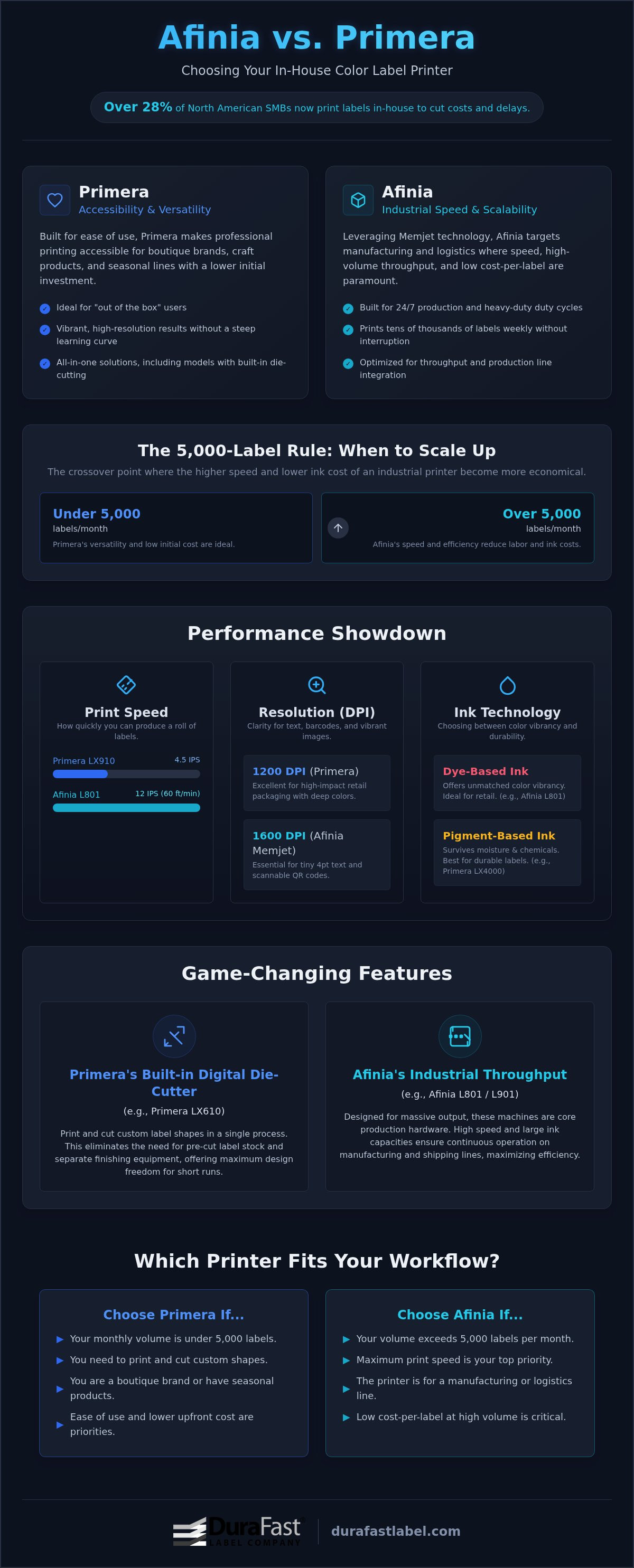
The final choice between Afinia vs Primera color label printers usually comes down to the 5,000-label rule. If your monthly volume stays below this mark, the lower entry cost and simplicity of a Primera model often make the most sense. Once you consistently cross that 5,000-label threshold, the high-capacity ink tanks and faster throughput of Afinia’s industrial models provide a much better return on investment. It's the moment your labeling moves from a support task to a core production process.
Decision Matrix by Industry
Different industries have unique demands that tip the scales. In Food and Beverage, you'll choose between the photographic vibrancy of dye-based inks for shelf appeal or the moisture resistance of pigment inks for refrigerated goods. Chemical and industrial sectors must prioritize BS5609 compliance. This requires pigment-based systems paired with specialty media like DuraFast Matte Chemical Labels. E-commerce businesses value raw speed. They need a system that can keep up with a fast-moving shipping department without constant maintenance delays.
The Role of Label Design Software
Hardware is only half the battle. BarTender Professional is the essential link that ensures your labels meet industry standards. It allows you to manage complex barcodes, serialization, and direct database connections without manual data entry. This software integration reduces human error and ensures every label is compliant, whether you're printing 50 or 5,000 units. For a deeper look at setting up your workspace, check out our guide on how to print your own product labels.
Sometimes, the best choice isn't Afinia or Primera. If your environment demands extreme durability and mid-range speed, the Epson ColorWorks C6000A is the better choice. It offers a rugged build and high-yield pigment ink that bridges the gap between desktop convenience and industrial power. Before you commit, we recommend requesting sample prints. Seeing your own designs on different media types is the only way to verify color accuracy and ink durability. Our team can provide a detailed cost-per-label analysis based on your specific artwork to ensure your new printer fits your workflow and your budget.
Take Control of Your Label Production
Bringing your labeling in-house is the most effective way to cut costs and increase flexibility. This guide shows that Primera excels in short-run versatility and custom shapes, while Afinia dominates the high-speed industrial market. Your decision on Afinia vs Primera color label printers should align with your 5,000-label monthly threshold and your specific durability requirements. Whether you need the built-in cutting of the LX610 or the 1600 dpi speed of the L801, the right choice will transform your daily workflow.
As an authorized North American dealer for both brands, DuraFast is here to help you navigate these technical choices. We offer expert guidance on BarTender Professional integration and keep specialized DuraFast Matte Chemical Labels in stock for immediate shipping. We don't just sell hardware; we provide the complete ecosystem of ink, media, and support you need to succeed. Compare Afinia and Primera models at DuraFast Label Company by speaking with our specialists today. You can stop overpaying for outsourced labels and start printing professional results on your own terms.
Frequently Asked Questions
Is Afinia better than Primera for small businesses?
Primera's often the preferred choice for startups and micro-businesses because of its lower initial hardware cost and user-friendly interface. However, Afinia becomes the better option for small businesses that are scaling rapidly and need higher throughput. If you print fewer than 5,000 labels monthly, a Primera LX-series unit is likely your best fit. For those moving into serious production, Afinia’s industrial speed helps reduce labor time and long-term costs.
What is the cheapest color label printer to run in terms of ink?
Afinia industrial models like the L801 or L901 are generally the most economical to run over time. These units use high-capacity 250ml ink tanks that significantly lower your cost-per-label compared to small desktop cartridges. While the upfront price is higher, the savings on consumables make it the cheapest option for high-volume users. When comparing Afinia vs Primera color label printers, the larger ink volume of Afinia always wins on efficiency for big runs.
Can Primera printers cut custom shapes automatically?
Yes, the Primera LX610's specifically designed with a built-in digital die-cutter to handle custom shapes automatically. This feature allows you to print and cut any label shape in a single pass without purchasing separate finishing equipment or pre-die-cut rolls. It’s an excellent tool for brands that need unique packaging for seasonal items or prototypes. This automation saves time and eliminates the need to stock multiple sizes of blank label rolls.
Do Afinia printers use pigment or dye-based ink?
Afinia offers both ink technologies depending on your specific model choice. The L701, L801 and L901 typically use dye-based Memjet inks for vibrant, photographic colors on retail packaging. If you need durability, the L502 (Pigment) and F502 (Pigment) models support pigment-based inks that resist water and chemicals. This flexibility ensures you can choose the right chemistry for your media, whether you're printing for high-end boutique shelves or harsh industrial environments.
How fast can the Afinia L801 print labels?
The Afinia L801's one of the fastest printers in its class, reaching speeds up to 12 inches per second. This allows you to produce 60 feet of full-color labels every minute at a crisp 1600 dpi resolution. Such high-speed performance is essential for businesses that need to keep up with automatic label applicators or high-volume shipping departments. It’s a significant leap in productivity compared to standard desktop inkjet printers that run at much slower speeds.
Which printer is best for GHS chemical label compliance?
For GHS chemical label compliance, you'll need a pigment-based printer like the Primera LX4000 or the Afinia L502 and NeuraLabel Callisto. These systems produce labels that resist smudging, chemicals, and UV exposure when paired with DuraFast Matte Chemical Labels. This combination is essential for meeting BS5609 standards for marine immersion and harsh environments. While dye-based printers offer more color pop, only pigment ink provides the industrial-grade durability required for safety and regulatory compliance.
Does DuraFast offer technical support for both brands?
Yes, DuraFast Label Company's an authorized North American dealer for both Afinia and Primera hardware. We provide comprehensive technical support to help you set up your equipment and troubleshoot any issues. Our team focuses on helping you achieve the lowest total cost of ownership by providing the right ink, media, and expert guidance. While we don't offer on-site repairs, we're dedicated partners in your in-house label production success.
What software do I need to design labels for Afinia and Primera?
BarTender Professional's the industry-standard software we recommend for both Afinia and Primera systems. It allows you to create complex designs, manage barcodes, and connect to your existing databases for seamless serialization. While both brands offer basic design tools, BarTender provides the advanced features needed for professional compliance and variable data printing. Using this software ensures that your label production remains efficient and accurate as your business grows and your labeling requirements evolve.