Durable Label Printers for Outdoor Equipment and Signage
24th Oct 2026
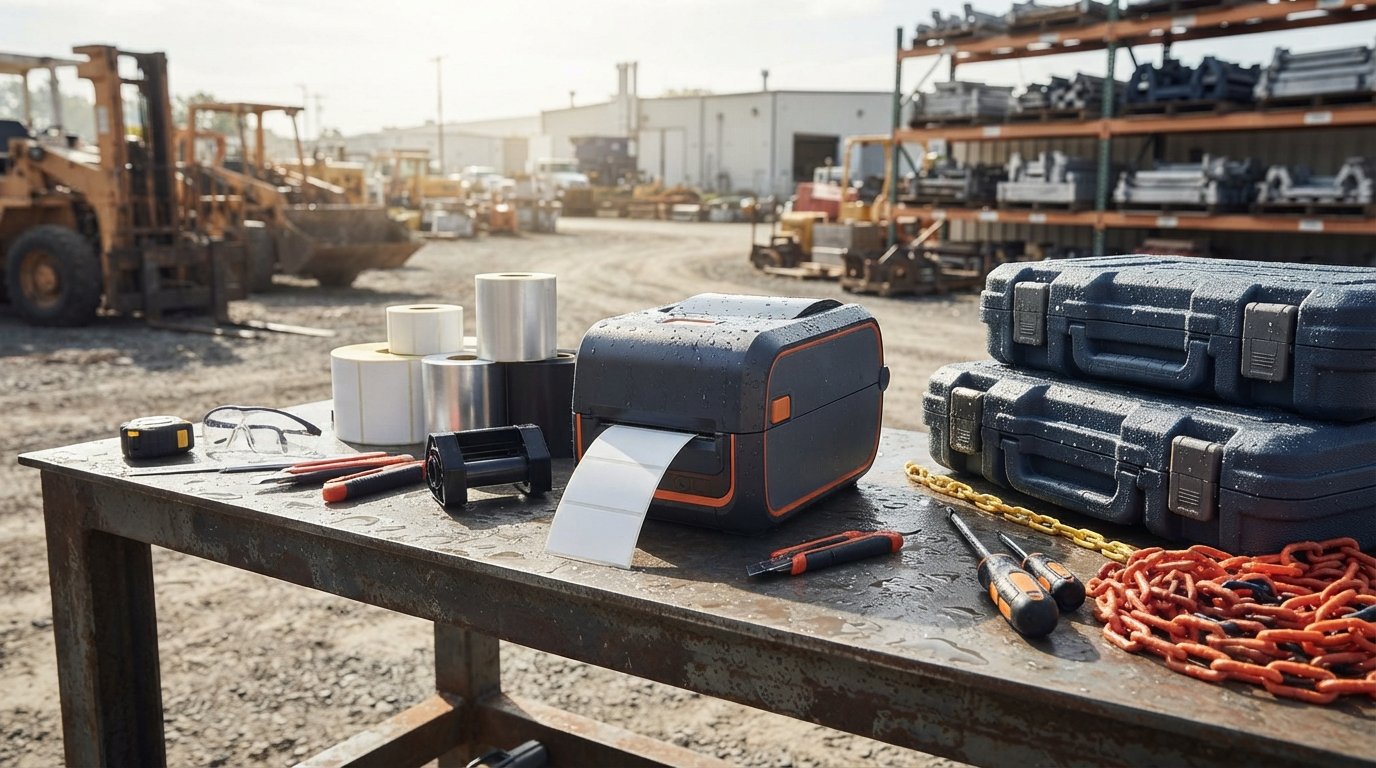
Outdoor signage is only useful if its message stays readable where the weather can reach it. For equipment labels and signs intended for outdoor use, pair a durable label printer for outdoor equipment with label material and ribbon suited to the conditions. Thermal transfer is a practical option for making durable labels, while the right stock depends on the surface and exposure.
It’s easy to focus on the printer and overlook the label itself. Rain, sunlight, handling, and the surface all affect how well a label performs. Match the printing method and supplies to the conditions to keep outdoor equipment identification clear and warehouse labels consistent.
This guide compares thermal transfer and direct thermal printing, explains what to consider when choosing materials for outdoor labels, and outlines a practical way to build a labelling system for equipment and warehouse operations. Use these criteria to match your printing setup to the job, because outdoor labels do not all face the same conditions.
Key Takeaways
- Match the printing method to the label’s environment and expected handling to help keep information readable outdoors.
- Choose label material based on exposure to sunlight, moisture, chemicals, abrasion, and temperature changes.
- Compare the full setup, including printer, labels, and ribbons, rather than considering the printer alone.
- Check that the printer and supplies suit the label material, including vinyl, polyester, or metalized stock.
- Consider the equipment surface and application temperature when selecting an adhesive for outdoor labels.
Thermal transfer vs direct thermal label printer for outdoor use
For outdoor equipment, choose the printing method and label stock together. Thermal transfer uses a heated printhead and ribbon to transfer ink onto a label. Direct thermal uses heat to darken a treated label surface, without a ribbon. A durable label printer for outdoor equipment is only part of the solution: the printed image and label face must also suit the exposure.
Thermal transfer is often preferred for equipment identification that needs to remain legible through handling and changing conditions. The ribbon and label material work together, so a compatible ribbon helps the print adhere to the label face. For example, a warehouse can print asset numbers on synthetic stock for outdoor tools. The printer alone cannot determine how long the label will last.
Direct thermal simplifies the setup because it does not use a ribbon. It can suit short-term identification, shipping labels, or outdoor applications when the stock is designed for those conditions. Standard direct thermal media can be more vulnerable to prolonged sunlight, heat, and abrasion than some thermal transfer combinations. Match the stock to the exposure rather than assuming all direct thermal labels perform alike.
Outdoor-specific direct thermal labels are available for uses such as shipping and equipment marking. For instance, direct thermal labels designed for outdoor use show why stock selection matters alongside printer technology. A label facing occasional rain differs from one exposed to direct sun, rubbing, and frequent handling. Identify the conditions first, then compare suitable print methods and supplies.
- Choose thermal transfer when durable identification and ribbon-based printing suit the job.
- Choose direct thermal when ribbon-free printing fits the application and appropriate stock is available.
- Compare the full combination of printer, ribbon, label face, adhesive, and equipment surface.
Consider a metal tool case stored outdoors. Thermal transfer may be a practical starting point, but the synthetic face and adhesive must also be compatible with the surface and conditions. For a package that spends limited time outdoors, purpose-designed direct thermal stock may be sufficient. These are not interchangeable recipes: exposure and handling determine the better fit.
Before choosing a setup, define what the label must communicate, where it will be applied, and what it will encounter. Test a sample on the actual equipment surface, then check readability after exposure and routine handling. This comparison helps show whether the print method, stock, and application work together in your conditions.
Which label materials resist UV, water, chemicals, abrasion, and extreme temperatures?
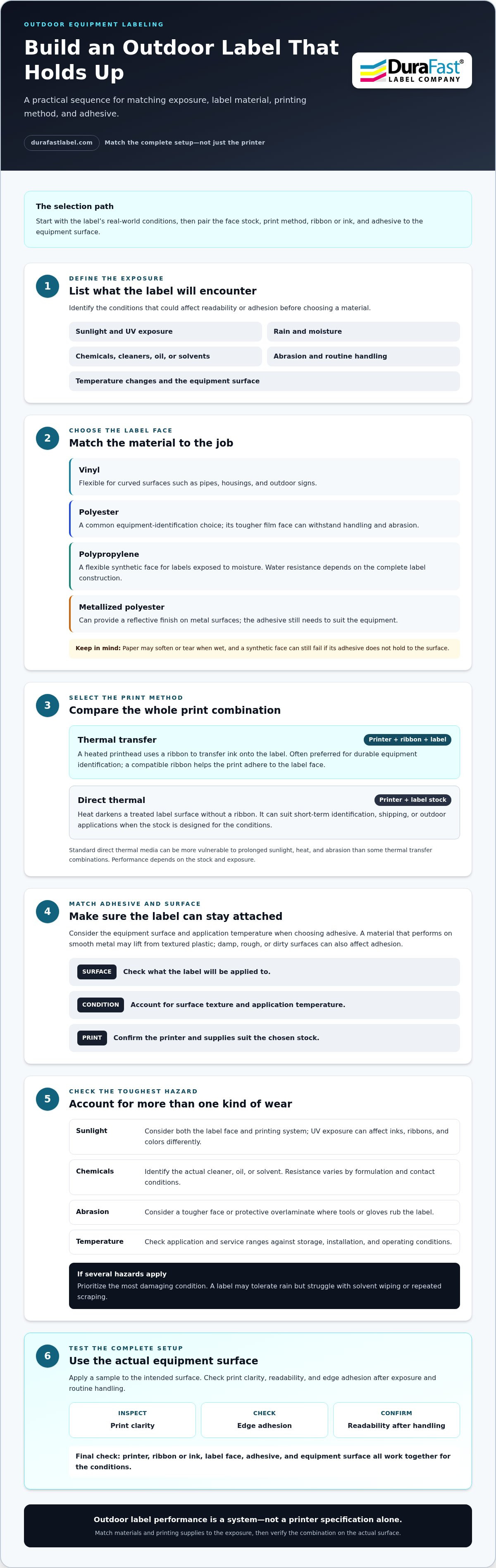
No single label face handles every outdoor hazard equally. Vinyl, polyester, polypropylene, and metallized film suit different equipment and exposures. First identify what could damage the label, such as sunlight, rain, cleaning agents, rubbing, or temperature swings. Then match the face material, print method, ink or ribbon, and adhesive to those conditions.
Vinyl flexes around curved surfaces, making it useful for pipes, housings, and outdoor signs. Its performance still depends on the formulation, print, and adhesive. Polyester is a common choice for equipment identification because its tougher film face can withstand handling and abrasion. For example, a polyester asset label may suit a metal control panel that technicians touch regularly.
Polypropylene provides a flexible synthetic face for labels exposed to moisture. Water resistance depends on the complete label construction, not just the face stock. Paper may soften or tear when wet, while a synthetic face can still fail if its adhesive cannot hold to a damp, rough, or dirty surface. Match the material to the actual substrate and exposure.
Sunlight can fade printed information, so consider both the label face and printing system. UV exposure may affect inks, ribbons, and colors differently. A durable face alone does not ensure lasting text. For a sun-exposed warning sign, choose a compatible print and label combination intended for that application. Test contrast and readability after exposure, especially for small text and barcodes.
- For chemicals: identify the actual cleaner, oil, or solvent. Chemical resistance varies by formulation and contact conditions.
- For abrasion: consider a tougher face or protective overlaminate where tools or gloves rub the label.
- For temperature changes: check the label’s application and service ranges against storage, installation, and operating conditions.
- For metal surfaces: metallized polyester can provide a reflective finish, but the adhesive must suit the equipment surface.
These factors work together. A label may tolerate rain but struggle with solvent wiping or repeated scraping. Likewise, a material that performs on smooth metal may lift from textured plastic. Clean the intended surface, apply a sample, and assess print clarity and edge adhesion under realistic handling. If a label faces several hazards, prioritize the most damaging condition.
For example, an outdoor pump label may face sunlight, water, oil, and routine cleaning. Choose its stock and print based on those specific exposures, then test it on the pump’s surface. If you need help matching label requirements to materials, discuss your label application.
How much do durable label printers, ribbons, and weatherproof labels cost?
The total cost depends on printer type, label construction, ribbon, and printing volume. A thermal transfer setup requires hardware, compatible ribbons, and label stock. Direct thermal removes ribbon from the supply list but still requires suitable labels. Compare the complete setup rather than judging equipment by purchase price alone.
Start with the printer’s intended workload. A warehouse producing asset labels in regular batches has different needs from a team printing occasional replacements. Print volume, label size, color requirements, and media compatibility all shape the equipment choice. A setup for simple black identification labels, for example, differs from one producing detailed, full-color outdoor signage.
Next, account for consumables. Label cost varies with face material, adhesive, dimensions, roll format, and order quantity. Synthetic stock designed for outdoor exposure may cost more than basic paper, but compare how each option performs in its intended setting. A label that lifts or becomes unreadable can mean replacement work and disrupt equipment identification.
For thermal transfer, include ribbon type and width in the estimate. The ribbon must match both the printer and label material. Wax, wax-resin, and resin ribbons serve different printing needs, so choosing only by initial price can result in poor print compatibility. Review thermal transfer ribbons alongside the label stock, not as a separate afterthought.
Build a useful comparison with these cost elements:
- Printer: match technology and expected workload to the operation.
- Ribbon or ink: account for the printing method and compatible consumables.
- Waste: consider setup labels, misprints, and stock left unused after a job.
- Workflow: include time spent changing media and producing replacement labels.
Then calculate the cost per usable label. Divide the cost of materials consumed by the number of readable labels produced. This gives you a practical way to compare setups, even when one uses higher-grade stock. For example, compare paper that needs frequent replacement with synthetic stock selected for an exposed equipment panel.
For a warehouse, estimate supply use by label type and printing frequency. Separate indoor bin labels from outdoor asset labels. This avoids using costly outdoor-grade materials where basic stock will do, while reserving suitable supplies for exposed equipment. Evaluate a durable setup by its full operating needs, not printer cost alone.
Which label printer can print on vinyl, polyester, and metalized labels?
Do not assume a printer can handle every vinyl, polyester, or metallized label. Media compatibility depends on printer technology, label coating, adhesive construction, and roll format. Start with the exact label type, then match it to a printer designed for that process. A material name alone does not establish compatibility.
Thermal transfer printers print by heating a ribbon against the label surface. They can work with compatible synthetic materials, including some vinyl and polyester stocks. The ribbon must suit the label coating and the print’s intended durability. For metallized stock, check that its surface accepts thermal transfer printing. A reflective finish does not guarantee that the ribbon image will adhere or scan clearly.
Inkjet label printers can print color graphics on compatible label stock. Vinyl, polyester, and metallized materials need a surface coating formulated for the printer’s ink. Without a suitable coating, ink may dry poorly, smear, or look dull. For example, a color logo on coated polyester may print differently from the same design on uncoated film.
Direct thermal is limited by the media itself. It requires heat-sensitive stock, so a vinyl, polyester, or metallized label must also be made for direct thermal printing. Do not choose it based only on the face material. Confirm that the specific stock is intended for direct thermal use and matches the printer’s feed and sensing system.
Before choosing equipment, compare these practical points:
- Printing method: identify thermal transfer, direct thermal, or inkjet requirements.
- Surface coating: match the coating to ribbon or ink chemistry.
- Media format: check roll or fanfold presentation, core, width, and gap or mark sensing.
- Print layout: confirm that the printer can handle label dimensions and required graphics.
- Use conditions: choose a print and material combination suited to outdoor exposure.
For example, an equipment maker printing black serial numbers on polyester might consider thermal transfer. A team printing colored warning graphics may need compatible inkjet stock. A reflective metallized identifier needs its own media test, especially if scanners must read its barcode. In each case, validate print contrast and adhesion on the actual label and surface.
Use a sample roll before standardizing a material across warehouse stations. Print the actual design, including small text and barcodes, then apply it to the intended equipment. Confirm that feeding is consistent and information remains legible after normal handling. Thermal transfer labels may suit the job when that process matches the stock. Choose a printer that supports the exact media construction and print method the application requires.
How to choose label adhesive for outdoor equipment surfaces and temperatures
Adhesive choice depends on the surface, temperature, and application conditions. A label that sticks to smooth steel may lift from textured plastic. Outdoor equipment also faces temperature changes, moisture, dirt, and handling. Identify these conditions before selecting a pressure-sensitive label. The face material and adhesive must work as one construction.
Start with the equipment surface. Smooth, clean metal usually gives adhesive more contact area than a rough or dusty housing. Curved pipes and narrow edges need labels that conform without lifting. Low-surface-energy plastics, such as some polyethylene housings, can be harder to bond to than metal. Match the adhesive to the actual substrate, not simply the equipment category.
Next, consider when the label will be applied. Application temperature may differ from the equipment’s normal operating temperature. A cold metal panel can prevent adhesive from wetting the surface properly, while a warm enclosure can affect how the label settles. Compare the label’s application and service ranges with the conditions during installation and use.
Surface preparation matters. Oil, dust, moisture, and cleaning residue can weaken the adhesive bond. Before applying a sample, clean the target area with a method suitable for that surface and let it dry fully. Press the label down evenly, especially at corners and edges. For example, a label applied over machine oil may peel even if its adhesive suits bare metal.
Consider the stresses the label will face after application. Outdoor pump housings may encounter rain and vibration. A tool case may have repeated contact with gloves, while a plastic guard may flex during use. Select an adhesive for both the surface and the stress. Edge lifting, bubbling, or shifting during a sample test can signal a mismatch.
- Smooth metal: prioritize clean contact and secure edge adhesion.
- Textured plastic: assess how well the adhesive reaches surface irregularities.
- Curved equipment: check whether the label conforms without bridging or curling.
- Cold installation: compare application conditions with the adhesive’s requirements.
- Frequent cleaning: consider exposure to the actual cleaner and wiping action.
Test the label on the actual equipment surface before standardizing it. Apply it using the intended cleaning and installation process, then check the edges after normal handling, moisture, and temperature changes. A test on flat cardboard will not predict adhesion on a painted valve or textured plastic cover. Record the stock and surface tested so warehouse teams can repeat a successful application.
For help matching label requirements to outdoor equipment surfaces, discuss your label application.
DuraFast Label Company: Epson ColorWorks C6000A
DuraFast Label Company offers the Epson ColorWorks C6000A as a reliable durable label printer for outdoor equipment and businesses comparing color label printing options. It also offers the Zebra ZT411 Thermal Transfer Printer, giving readers options to consider across different printing approaches.
For outdoor equipment, the printer is only one part of the decision. Match the label stock and printing method to the surface, exposure, and information you need to display. DuraFast Matte Chemical Labels may suit applications where chemical-label stock is relevant, while the Zebra ZT411 and DuraFast Thermal Transfer Ribbons form a thermal transfer option to explore.
DuraFast Label Company offers label printers and supplies to support equipment-labelling workflows. Explore the available equipment and materials, then contact DuraFast to discuss your requirements.
Turn your label requirements into a practical setup
Before choosing a durable label printer for outdoor equipment, define what each label must communicate and where it will be applied. A clear equipment-label standard helps teams keep asset identification consistent across outdoor sites and warehouse workflows. Start with a representative label and surface, then use that test to guide your material and printing-method choices.
DuraFast Label Company offers the Epson ColorWorks C6000A and Afinia L801 Color Label Printer for businesses considering color label printing. It also offers DuraFast Matte Chemical Labels. These are options to explore as you align your printer and label needs with the intended application.
Bring your label use, equipment surface, and printing requirements together before settling on a setup. Contact DuraFast Label Company to discuss your requirements and take the next step with confidence.
Frequently Asked Questions
What label printer is best for durable outdoor equipment labels?
A thermal transfer printer is a strong choice for durable equipment labels when paired with compatible synthetic stock and ribbon. The best durable label printer for outdoor equipment depends on the label’s content, material, and printing workflow. For example, consider the Zebra ZT411 Thermal Transfer Printer for thermal transfer printing, or the Epson ColorWorks C6000A when color label production is the priority. Match supplies to the specific application.
How to create labels with barcodes or QR codes for outdoor equipment?
Choose a printer, label stock, ribbon, and adhesive suited to the equipment surface and outdoor exposure. Print a sample barcode, apply it to the actual surface, and check readability after exposure and routine handling.