How to Estimate Label Printing Cost per Sheet
7th Nov 2026
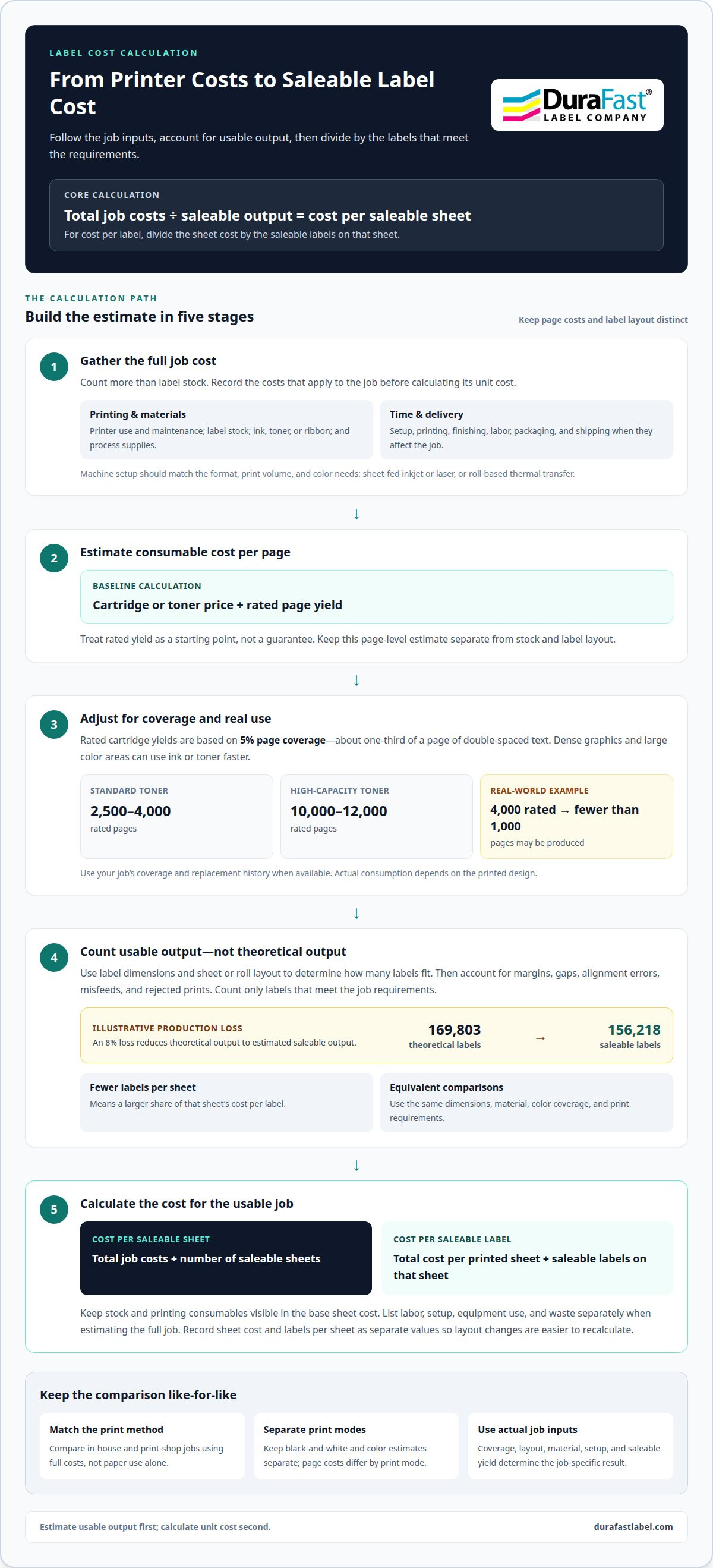
Estimate label cost per sheet by adding printer use, label stock, ink or ribbon, labor, and production waste, then dividing by the number of saleable sheets. A label printing cost per sheet calculator gives a useful estimate only when it counts usable output, not just the material that goes into the printer. For example, an illustrative 8% production loss reduces 169,803 theoretical labels to an estimated 156,218 saleable labels.
It’s easy to focus on label stock and overlook the other costs that add up during printing. This guide explains how to account for the printer, stock, consumables, labor, color coverage, and thermal transfer. You’ll also see how label size, layout, setup, and waste affect the total, so you can compare printing methods on a like-for-like basis. Use the calculation as a practical estimate for your job, whether you print on sheets or from a roll.
Key Takeaways
- Build a realistic estimate by counting printer use, label stock, ink or ribbon, labor, and setup time, not material alone.
- Divide total job costs by saleable output to find a useful per-page or per-label figure.
- Use label dimensions, roll layout, margins, gaps, and production waste as calculator inputs because they affect how much stock becomes usable labels.
- Account for color coverage and consumable yield when comparing print methods; cartridge estimates can differ from real-world use.
- For roll-based jobs, include thermal transfer ribbon and process costs, then compare the result with sheet-label options for the intended workflow.
Printer, paper, consumable, and productivity costs
Build the estimate from the printer setup, stock, consumables, and usable output. Then add any setup, waste, packaging, or shipping costs that affect the finished job.
-
Assess Printer Configuration and Production Costs
Match the machine setup to the label format, print volume, and color requirements. Sheet-fed inkjet and laser printers use different consumables from roll-based thermal transfer systems. Include equipment use and maintenance in the estimate: purchase cost, upkeep, and downtime all affect production. Don’t compare printers by speed alone; usable output and print quality matter too.
For specialty inkjet stock, such as inkjet card-grading labels, include the stock itself as a separate input. The actual cost per sheet also depends on how many labels fit and print successfully.
-
Include Productivity and Hidden Costs
Record setup time, printing time, and any finishing work, then calculate their cost using your applicable machine and labor rates. Add paper, ink, toner, and supplies such as razor blades where the process uses them. Include waste from misfeeds, alignment errors, and rejected prints; an illustrative 8% production loss reduces 169,803 theoretical labels to 156,218 saleable labels.
Include shipping and packaging in the job total when materials or finished work need to be transported. These costs can change the delivered cost per sheet even when the print process stays the same.
-
Compare Home and Print-Shop Costs
Compare the full cost of printing in-house with the total cost of a print-shop job, rather than looking only at the printer’s paper use.
For 1,000 color copies, consider whether a print shop better fits the job. Include equipment use, consumables, setup, and shipping in either option, then compare the cost per usable sheet.
-
Consider Custom Label Price Factors
Identify the label material, color coverage, and finish before estimating a job. These choices affect stock and consumable use, while the sheet layout determines how many labels fit on each sheet. Use the same dimensions and print requirements when comparing options; otherwise, the per-sheet figures won’t represent equivalent jobs.
For ink or toner, use the rated page yield as a starting point, then adjust for actual coverage. Treat the result as a page-level estimate, not a guaranteed label-sheet cost.
Calculating base cost per printed page
Start by calculating the cost of one usable printed sheet. Then divide it by the number of saleable labels on that sheet. Keep page-based printer costs separate from the label layout so the result reflects actual output.
- Set the printer’s consumable cost per page. Divide the cartridge or toner price by its rated page yield. Treat the result as a baseline, not a promise of actual output.
- Adjust the yield for print coverage. Cartridge page yields are based on 5% page coverage. That coverage corresponds to about one-third of a page of double-spaced text, so dense graphics or large color areas can use ink or toner faster. Standard toner cartridges yield 2,500-4,000 pages; high-capacity cartridges yield 10,000-12,000 pages. Actual consumption depends on the printed design.
- Compare rated yield with real use. A toner cartridge rated for 4,000 pages may run out after fewer than 1,000 pages under real-world conditions. Use your own job’s coverage and replacement history when available. Otherwise, calculate a conservative estimate using the actual yield your work produces, rather than relying on the cartridge’s rated maximum.
- Convert sheet cost into label cost. Divide the total cost per printed sheet by the number of saleable labels it contains. Count only labels that meet the job requirements, not blank spaces or rejects.
- Keep the cost categories visible. Add stock and printing consumables to find the base sheet cost. List labor, setup, equipment use, and waste separately when estimating the full job. This makes it easier to see whether coverage, layout, or usable yield is driving the result. A label printing cost per sheet calculator is most useful when its inputs match the job.
- Use the result to guide the next calculation. Record the cost per sheet and labels per sheet as separate values. Then you can recalculate quickly if the design or layout changes, without rebuilding the printer-cost estimate. For help applying the method to your label workflow, discuss your cost calculation.
These estimates can serve as a cross-check alongside the consumable-and-paper calculation. Keep black-and-white and color output separate, because the estimated page costs differ by print mode for each printer price. Select the estimate that matches the printer and output being assessed, and retain it as a page-level comparison. This can help show whether the assumed printing cost is in line with the estimate, while the actual coverage and usable label count still determine the job-specific calculation.
Calculator inputs and assumptions
Enter dimensions, layout, material, output loss, and job costs separately. The example below shows how a 500 mm roll becomes an estimated count of saleable labels.
- Enter label size and sheet or roll dimensions. How do label size and the number per sheet affect cost per label? Larger labels generally fit fewer across a sheet, while smaller ones may increase the count. Divide the sheet cost by its saleable label count: fewer labels mean a larger share of the sheet cost per label. For preprinted orders, the U.S. Department of Agriculture, Forest Service identifies dimensions and printing material as details to specify.
- Calculate the layout, including margins and gaps. In the example, each label measures 50 × 50 mm, with 10 mm side margins and 3 mm horizontal and vertical gaps. Nine labels fit across the 500 mm web: their combined width is 474 mm, leaving room within the 480 mm usable width. The 3 mm vertical gap creates a 53 mm repeat pitch along the roll.
- Estimate theoretical output before waste. A 1,000 m roll contains 18,867 repeat positions at that 53 mm pitch. Multiply 18,867 positions by 9 labels across to get 169,803 theoretical labels. This count is a layout estimate, not the saleable quantity. Keep the roll length, label dimensions, margins, and gaps visible in the calculator so changes update output correctly.
- Apply production loss to find saleable output. An illustrative 8% production loss reduces 169,803 theoretical labels to 156,218 whole saleable labels. Use saleable output as the denominator when calculating material cost per label. If the printing process is unfamiliar, an estimator recommends adding at least 100% inefficiency. Include an allowance for production inefficiency when setting prices.
- Enter material and operating assumptions. The example roll uses 80 gsm paper and weighs an estimated 40 kg. Add plates, dies, electrical power, and building rent where relevant.
Keep order-specific inputs separate from production and operating costs. This lets you check and adjust the estimate without changing unrelated assumptions. For preprinted label orders, the U.S. Department of Agriculture, Forest Service recommends specifying details such as the label’s dimensions and printing material. Record these in separate fields, with the selected material visible alongside the dimensions used for the layout.
List tooling and overhead separately rather than folding them into material cost. Label-printing businesses should account for plate and die costs for different sizes, so the estimate reflects the selected size. Also estimate overhead such as electricity and building rent. Showing each input separately makes it easier to see what drives the estimate and update the relevant entry when dimensions, material, tooling, or operating-cost assumptions change.
Color printing cost calculation
Estimate color printing from the design’s coverage and the printer’s consumables. Keep color costs distinct from stock and other job expenses.
- Classify the artwork before estimating. Separate black text, spot color, and full-color graphics in the file. A small colored logo and a page covered in photographs use different amounts of ink or toner. Note which colors appear and how much of the printable area they cover. This makes the estimate reflect the design instead of treating every color page alike.
Use that figure as a high-coverage example, not a universal rate for every color label sheet.
- Use a per-page baseline, then adjust for coverage. Start with the printer’s consumable cost per page, based on cartridge or toner cost and expected yield. Then assess whether the design uses light accents or dense blocks of color. Page yield is a reference point; artwork coverage affects how much consumable each printed sheet uses.
Keep the baseline and coverage adjustment as separate calculator inputs. That way, enlarging a logo or adding a colored panel changes the print estimate without changing the label-stock calculation.
- Calculate color cost at the sheet level. Add the estimated color-printing cost to the sheet’s other printing costs. Divide the total by the number of saleable labels on the sheet to estimate color cost per label. For example, use C for color cost per sheet and N for saleable labels: color cost per label equals C divided by N.
Keep this figure separate from the full job cost. Record setup, labor, and rejected output in their own inputs so the color component is easy to revise.
- Compare equivalent print jobs. Use the same label dimensions, layout, and artwork when comparing color modes or printer estimates. A sheet with a small colored mark isn’t equivalent to one with dense graphics. Keep print-quality requirements consistent too, since a different required result can change the settings and consumable use.
- Test the estimate against a sample sheet. Print a representative design that includes its largest color areas and fine details. Compare it with the coverage assumed by the calculator, and revise the color input if the design is denser than expected. Save the estimate with the artwork version so a later change to color placement prompts a fresh calculation.
Thermal transfer label cost calculation
For thermal transfer, include label stock, ribbon, setup, and production time. Divide the full job cost by the saleable label count for a useful unit estimate.
- Set the saleable label count. Start with the finished quantity the order requires, not the theoretical press output. Account for process waste to determine how many labels must be produced. Use the saleable count as the denominator for material, ribbon, and job costs, and exclude rejected labels.
- Calculate the label-stock component. Divide material cost by saleable output. This is the stock component, not the full manufacturing cost. Keep cores, freight, and other applicable charges separate.
- Add thermal transfer ribbon use. Include the ribbon consumed during the print run and the time needed to load or change it. Ribbon use depends on the printed area and job length, so base the estimate on the artwork and quantity. Don’t assume a small printed mark and a large filled area use the same amount.
Direct thermal printing avoids ribbon costs and ribbon-change time. However, direct thermal labels generally cost more than similarly sized thermal transfer labels. Compare the total costs of each process rather than treating ribbon use as the only difference.
- Include setup and production costs. Add setup, machine time, and process work to the material and ribbon costs. Because fixed costs are spread across the order, quantity affects the resulting unit cost.
- Check the order-size effect. The variable component stays constant, while the fixed setup cost is allocated across more labels as quantity rises.
- Compare the full cost per saleable label. Treat it as a job example, not a universal rate. For a calculation tailored to your stock, ribbon, and order quantity, discuss your thermal transfer label requirements.
DuraFast Label Company: inkjet sheet labels
DuraFast Label Company offers inkjet sheet labels and equipment for businesses estimating in-house color-label production. Consider these options when your layout suits sheet printing and you want to assess stock, printer, and software together.
The Epson ColorWorks C6000A and professional color label printers are great options for color label printing. Labelview label design and barcoding software can support label layout and barcode design. Match your estimate to the intended label size, artwork coverage, sheet yield, and expected waste before choosing supplies and equipment.
If you’re comparing inkjet sheet labels with another printing setup, contact DuraFast Label Company to discuss your requirements and find the ideal solution using a reliable label printing cost per sheet calculator approach.
Make your next label run easier to plan
Use your estimate as a working baseline, then revisit it whenever the design, material, or production routine changes. A label printing cost per sheet calculator is most useful when its assumptions reflect the job you’re preparing. This helps you identify which changes affect unit cost and which alter only the finished appearance.
If your project calls for a different stock, consider DuraFast Matte Chemical Labels as part of your material selection. Share your intended label use and printing approach with DuraFast to keep the next decision focused on fit.
Share your label printing requirements with DuraFast Label Company and take the next step with a clearer plan.
Frequently Asked Questions
How Much Does It Cost to Manufacture a Label?
Manufacturing cost depends on the job’s materials, print method, setup, and saleable quantity. To estimate it, add stock, ink or ribbon, machine and labor time, setup, and production losses. Then divide the total by the labels that meet the finished job’s requirements. A short run may have higher setup cost per label, while a larger run spreads fixed costs across more output.
How do you calculate label printing cost per sheet?
Add the sheet’s stock cost, printer consumables, and applicable production costs, then divide by the usable sheet count. To estimate cost per label, divide the resulting sheet cost by the number of saleable labels on each sheet. A label printing cost per sheet calculator is most useful when you enter the actual layout and count rejected output separately. This keeps the per-sheet figure distinct from the per-label figure.
What is the average cost to print one sheet of labels in the US?
There’s no single average cost that fits every label sheet: the stock and printing method both affect the total. A plain-page estimate won’t necessarily represent die-cut label stock, dense color artwork, or a different number of labels per sheet. For a useful U.S. estimate, calculate the selected stock and printer consumables for the specific design, then include any applicable setup or waste.