The Ultimate Guide to Label Design Software for In-House Printing in 2026
4th Jul 2026

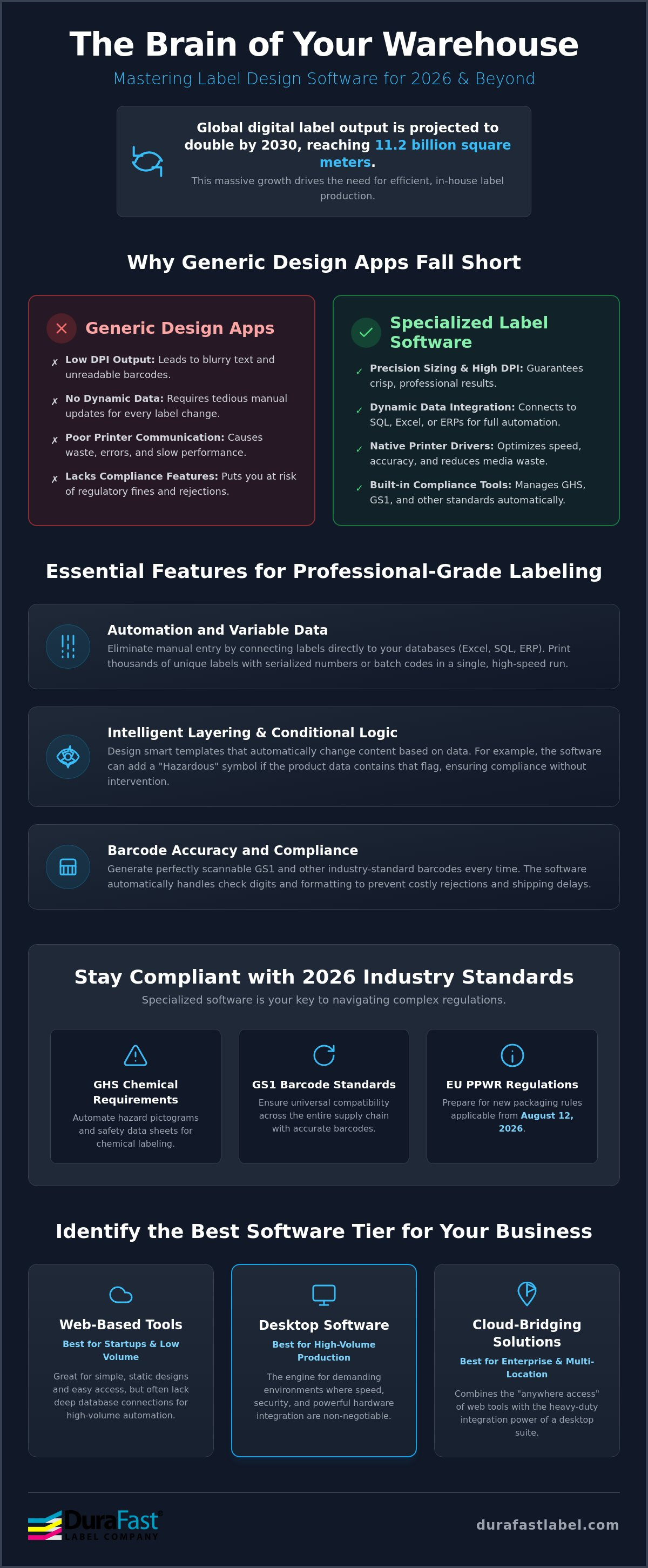
Did you know the global output of digital labels is expected to double by 2030, reaching a staggering 11.2 billion square meters? This massive growth highlights a major shift toward in-house production as businesses look to escape the high costs and delays of outsourcing. Finding the right label design software is no longer just about aesthetics. It's the essential brain of a modern, efficient warehouse that keeps your products moving.
You probably feel the pressure of managing endless SKUs while trying to stay compliant with complex GHS or GS1 barcode standards. It's a lot to handle, especially with new rules like the EU Packaging and Packaging Waste Regulation (PPWR) becoming applicable on August 12, 2026. We're here to help you simplify that complexity. This guide shows you how the right software transforms your printing from a manual chore into an automated, compliant powerhouse. We'll break down the best tools for 2026, explain how to handle variable data, and ensure your design-to-print workflow stays fast and professional.
Key Takeaways
- Learn why generic design apps fall short and how specialized label design software acts as the central brain for your entire printing operation.
- Discover how to eliminate manual data entry by connecting your labels directly to Excel, SQL, or ERP systems for automated batch coding.
- Understand how to stay compliant with strict 2026 industry standards, including GHS chemical requirements and new EU packaging regulations.
- Identify the best software tier for your business size, from entry-level tools to enterprise solutions that manage thousands of SKUs.
- Master the synergy between professional software and industrial hardware to create a high-speed, error-free production line.
What is Label Design Software and Why is it Essential?
Think of label design software as the specialized brain of your in-house printing operation. It isn't just a basic drawing tool. It's a technical platform designed to create, manage, and print labels with absolute precision. While general graphic design apps focus on visual flair, labeling software prioritizes data integrity and hardware communication. It allows you to build complex templates that pull information directly from your business databases, ensuring every serial number and price point is accurate.
Moving your production in-house offers incredible flexibility, but it requires the right digital foundation. Dedicated software provides several critical benefits that standard office programs can't match:
- Precision Sizing: You can define label dimensions down to the millimeter, ensuring your design fits the physical media perfectly.
- Technical Accuracy: The software generates a high-quality Barcode that remains readable by scanners, reducing shipping errors and retail rejections.
- Native Communication: It speaks the specific language of your printer, optimizing speed and reducing ink or ribbon waste.
The Difference Between Web-Based and Desktop Software
Web-based tools are often the first stop for startups. They're accessible and great for low-volume projects with static designs. However, they usually lack deep database connections. Desktop software is the engine for high-volume environments where security and speed are non-negotiable. Modern enterprises are increasingly turning to cloud-bridging solutions like Loftware. These platforms offer the "anywhere" access of a browser with the heavy-duty integration power of a desktop suite, making it easier to manage labels across multiple warehouse locations.
Why General Design Tools Fall Short
Standard design tools often struggle with the technical requirements of industrial printing. They frequently mishandle color management or default to low DPI settings, which leads to blurry text and unreadable codes. Professional software is different. It ensures your Epson ColorWorks C6000A or other high-end color label printer produces crisp, vibrant results every time. General tools also lack dynamic data fields. If you need to change a batch number on 500 labels, a general tool forces you to do it manually. Specialized label design software does it automatically in seconds, saving you hours of tedious work and preventing costly human errors.
Essential Features for Professional-Grade Labeling
Choosing the right label design software means looking under the hood at the technical capabilities that drive warehouse efficiency. A professional tool doesn't just hold an image; it manages a complex set of rules and data points. While basic apps focus on static layouts, industrial-grade solutions use dynamic data and database integration to pull information directly from Excel, SQL, or your ERP system. This connection ensures that your labels always reflect the most current prices, weights, and product names without anyone having to type them in manually.
Modern production also relies on layering and conditional logic. This advanced feature allows the software to change the label's appearance based on specific data triggers. If a product is marked as "hazardous" in your database, the software can automatically insert the correct warning icon and safety text. This level of intelligence prevents shipping errors and keeps your production line moving without constant human intervention.
Automation and Variable Data
Manual entry is the enemy of a fast warehouse. By pulling data directly from your inventory list, you eliminate the risk of typos that lead to mislabeled stock. Serialization is another critical tool for tracking and tracing products across the supply chain. Variable Data Printing is the ability to change specific label elements without stopping the print run. This feature allows you to print thousands of unique labels, each with its own batch code or serial number, in one continuous and high-speed operation. If you're struggling to map out these automated workflows, our specialists can help you find the right integration path.
Barcode Accuracy and Compliance
A barcode that won't scan is worse than no barcode at all. Professional label design software handles check digits automatically, ensuring every code is mathematically correct and readable. It also provides built-in support for GS1 barcode standards, which are the global language for retail and logistics. To maintain a truly error-free environment, many businesses use Datalogic barcode scanners to verify software-generated codes immediately after they're printed. This verification step ensures that your 1D, 2D, and QR codes meet the strict compliance requirements of your retail partners and shipping carriers.
Comparing Software Tiers: From Free Tools to Enterprise Solutions
Choosing the right label design software often starts with a simple question: can I just use something free? While online forums often suggest basic graphic tools or "free" generators, these options usually come with a steep hidden price. You'll likely spend hours on manual adjustments and deal with frequent alignment errors. These mistakes lead to a pile of wasted inkjet labels and lost production time. For a growing business, the goal isn't just to make a sticker; it's to build a reliable system that scales with your needs.
Entry-level tools work well for one-off projects or very low volumes. However, as your SKU count grows, you'll find that manual data entry becomes a massive bottleneck. Professional-tier software moves you away from static designs and into the world of automation. This level is necessary once you need to connect to a live database or manage complex inventory lists. Enterprise solutions take this a step further by offering centralized management for multi-site operations and high-level security features to protect your data integrity.
When to Upgrade to BarTender or NiceLabel
You'll know it's time to upgrade when your team spends more time fixing label layouts than actually shipping products. Professional suites like BarTender Label Software provide the automation needed to handle thousands of unique items without breaking a sweat. These tools ensure that every print job is perfectly aligned, which drastically reduces media waste. They also make it easy to stay compliant with safety regulations, such as the OSHA Hazard Communication Standard (HCS), by automating the placement of required hazard pictograms and statements.
Comparing the Industry Leaders
BarTender and Loftware NiceLabel are the two heavyweights in the label design software market. BarTender is widely praised for its intuitive, "Word-like" interface and powerful integration capabilities. NiceLabel offers a very modern, user-friendly experience and excels in cloud-based deployments. If you're working in a highly complex industrial environment, you might also consider specialized solutions like Teklynx or CODESOFT. These programs are built for deep integration into manufacturing execution systems. In 2026, the industry has largely shifted toward subscription models, though some brands still offer perpetual licenses for businesses that prefer a one-time investment. Choosing between them depends on whether you value low upfront costs or long-term ownership.
Industry-Specific Requirements: GHS, Barcoding, and Compliance
Compliance isn't optional. It's a fundamental part of doing business in 2026. Specialized label design software acts as a regulatory filter, ensuring your products meet local and international laws before they ever leave the dock. Generic tools leave too much room for human error. A single mistake on a medical device label or a chemical drum can lead to massive fines or rejected shipments. Professional software automates these complex rules so your team doesn't have to memorize every changing regulation.
Other industries have similarly strict needs. Medical device manufacturers use specialized tools to meet UDI requirements, while food producers rely on automated nutritional fact panel generators. These features ensure that allergens are highlighted correctly and font sizes meet legal minimums. For logistics, the software integrates directly with carriers like UPS, FedEx, and Amazon. This allows you to generate shipping labels with the correct routing codes and tracking numbers automatically, cutting down on manual entry time.
GHS and Chemical Compliance
Chemical manufacturers face some of the toughest labeling standards in the world. The Globally Harmonized System (GHS) requires a specific combination of signal words, hazard statements, and pictograms. Professional software automates this by pulling data directly from your Safety Data Sheets (SDS). It dynamically manages the nine standard GHS pictograms, placing only the necessary icons on the label based on the chemical's hazard level. But the digital design is only one part of the equation. For labels that must survive harsh environments or marine transport, you must pair your software with DuraFast Matte Chemical Labels to ensure BS5609 compliance. GHS compliance requires both the correct software logic and chemical-resistant media.
Inventory and Asset Tracking
Tracking high-value assets requires labels that can withstand the test of time. In a warehouse setting, labels are often exposed to friction, moisture, and temperature swings. Using thermal transfer labels provides the long-term legibility needed for asset tags and inventory bins. Modern label design software also enables the creation of RFID-enabled labels. These allow your team to track inventory in real-time as it moves through the facility, significantly improving warehouse throughput. If you need help determining which compliance features are right for your specific industry, contact our experts today for a personalized consultation.
Optimizing Your Workflow with Professional Software and Hardware
The most advanced label design software is only as effective as the hardware it controls. To achieve a truly high-efficiency warehouse, your digital templates must communicate perfectly with your printers. There is a powerful synergy between BarTender and Epson ColorWorks printers. This pairing allows you to print high-resolution, full-color labels on demand without the lag times typically associated with complex graphics. By moving the logic into the software, you reduce the processing load on the printer, leading to faster first-label-out times and smoother production runs.
Optimizing the "Design to Apply" process is where businesses see the biggest reduction in labor costs. When your software is integrated with your ERP, the printer becomes a seamless extension of your data. You don't just print; you automate. DuraFast Label Company supports this integration by providing the exact media and technical guidance needed to make these systems work together. Whether you're running a small desktop setup or a massive industrial line, the goal is a friction-free workflow that requires minimal human intervention.
Hardware Integration and Drivers
Drivers are the unsung heroes of label production. Seagull Scientific drivers play a massive role here because they're built to maximize the performance of over 4,000 different printer models. When you're setting up Zebra industrial printers, using these high-performance drivers ensures that your label design software can access every native feature of the hardware. This includes everything from media cutters to RFID encoders. If you encounter connectivity issues, it's often a matter of driver configuration or port settings. Correcting these small technical hurdles early prevents major downtime during peak shipping seasons.
Future-Proofing Your Labeling Strategy
The labeling landscape is shifting toward more connected and data-rich formats. Many enterprises are already moving toward cloud-based management with Loftware Cloud. This allows for centralized control over label templates across multiple global sites, ensuring brand consistency and regulatory compliance everywhere. You should also start preparing for the industry-wide move toward 2D barcodes in retail, which is a major mandate targeted for 2027. Investing in professional label design software today isn't just a purchase; it's a long-term business asset. It ensures your operation remains agile, compliant, and ready for whatever the next decade of logistics brings.
Take Control of Your In-House Production Today
Choosing the right label design software is the final step in turning a chaotic warehouse into a streamlined, high-efficiency operation. We've explored how these tools manage complex data, ensure compliance with global standards, and bridge the gap between your digital records and physical printers. Whether you're upgrading to handle thousands of SKUs or simply want to eliminate manual entry errors, the right software provides the foundation for sustainable growth.
DuraFast Label Company is here to help you navigate this transition with ease. As an authorized partner for BarTender and Loftware, we're specialists in Epson and Zebra hardware integration. Our North American support team has the hands-on expertise to ensure your software and hardware work in perfect harmony. You don't have to tackle technical hurdles alone.
Ready to transform your workflow? Browse professional label design software at DuraFast Label Company and speak with our specialists to find the perfect fit for your business. Your high-efficiency future is just one smart decision away.
Frequently Asked Questions
Is there a free label design software that works with any printer?
Most printer manufacturers provide basic versions of design tools, but these are typically locked to their specific hardware. For a truly universal tool, you can find open-source options or basic online generators. However, these often lack the specialized drivers needed for high-speed industrial printing. Most businesses find that the "free" price tag leads to higher costs in wasted media and manual labor due to alignment errors.
Can I use Microsoft Word or Excel to design my product labels?
You can use these programs, but it isn't recommended for professional production. Word lacks precise alignment for rolls and doesn't handle the high-resolution requirements of barcodes well. Excel is an excellent data source, but it isn't a design tool. Professional label design software is built to bridge these two, using your Excel data to populate a layout designed specifically for your printer's dimensions.
What is the best software for creating GHS compliant chemical labels?
BarTender and Loftware NiceLabel are the industry leaders for GHS compliance. These platforms include built-in libraries of the nine standard GHS pictograms and can automate hazard statements based on your Safety Data Sheet (SDS) data. This automation ensures your labels stay accurate even when regulations change. It is a much safer and faster approach than building templates manually or using generic design apps.
Do I need a graphic designer to use professional label software like BarTender?
No, you don't need a professional designer to create high-quality labels. These programs use "drag-and-drop" interfaces that feel very similar to standard office software. Most users can create a professional template in minutes using pre-built wizards for barcodes and text fields. The software handles the technical formatting, so your team can focus on data accuracy rather than complex design principles.
How does label design software connect to my existing inventory database?
Most professional suites use standard database connectors to link with Excel, SQL, or ERP systems. Once connected, you simply map specific data fields to your label layout. When you hit print, the label design software pulls the latest information directly from your records. This ensures every batch code and price point is current without any manual typing, which significantly reduces the risk of human error.
What is the difference between BarTender Professional and Automation editions?
BarTender Professional is designed for manual printing where a user selects a record and hits print. The Automation edition takes this a step further by allowing other software programs to trigger print jobs automatically. If you want your labels to print the moment an order is scanned or entered into your ERP, the Automation tier is the necessary choice for a truly modern and efficient facility.
Can I design and print RFID labels with standard design software?
You can, provided you choose a version that specifically supports RFID encoding. Standard design tools at the entry level might only handle visual elements. Professional and Enterprise tiers include the logic needed to write data to the RFID chip while simultaneously printing the visual barcode on the surface. This dual capability is essential for businesses implementing modern asset tracking or real-time inventory management.
Does label design software include barcode generators for retail?
Yes, professional software includes built-in generators for almost every barcode type used in retail and logistics. This includes standard UPC codes, QR codes, and complex GS1 formats. The software automatically calculates the required check digits for you. This means you can be confident that your codes will scan correctly at the checkout or in the warehouse, preventing costly retail rejections or shipping delays.